
A JSON formatter is an online tool that organizes JSON data into a readable structure using indentation and line breaks. This one also minifies and validates JSON.

JSON Formatter
Format and validate JSON data with ease.
Working with JSON is difficult when the data arrives on a single line or with inconsistent spacing. Tool Flora’s JSON formatter turns hard-to-read JSON into a clean, indented structure that is far easier to understand and inspect.
Paste your JSON in, choose an indent, and format it — then review the result to be sure you got what you expected. The same tool also minifies JSON back down to one line and validates it, which helps when you are developing applications, working with APIs, checking configuration files, or troubleshooting data.
Instead of adding spaces and line breaks by hand, the formatter organizes the structure for you.
How to Use the JSON Formatter
It is simple to use and needs no coding setup; a general understanding of JSON is enough.
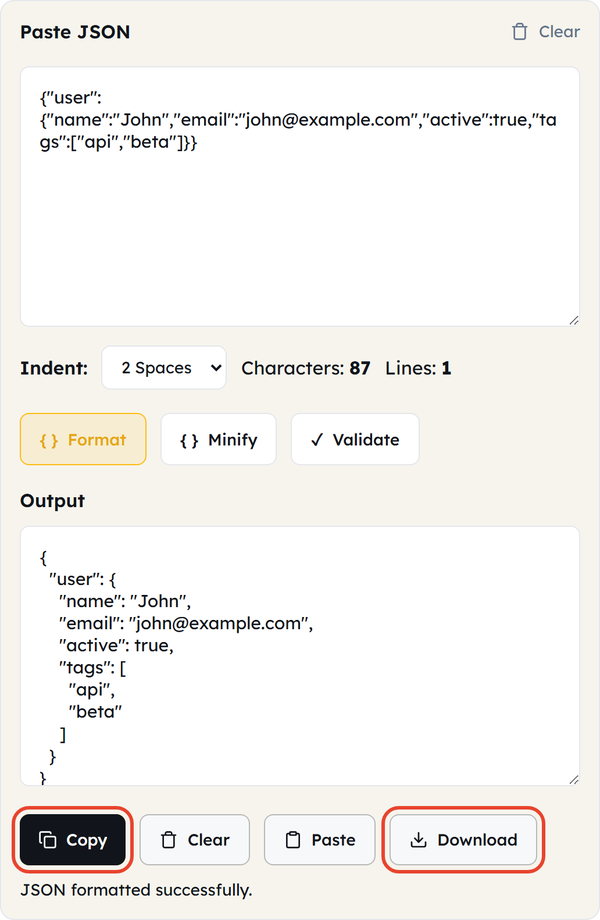
- Paste your JSON — drop it into the Paste JSON box, or click Paste to pull in whatever is on your clipboard. Characters and Lines are counted underneath as you go.
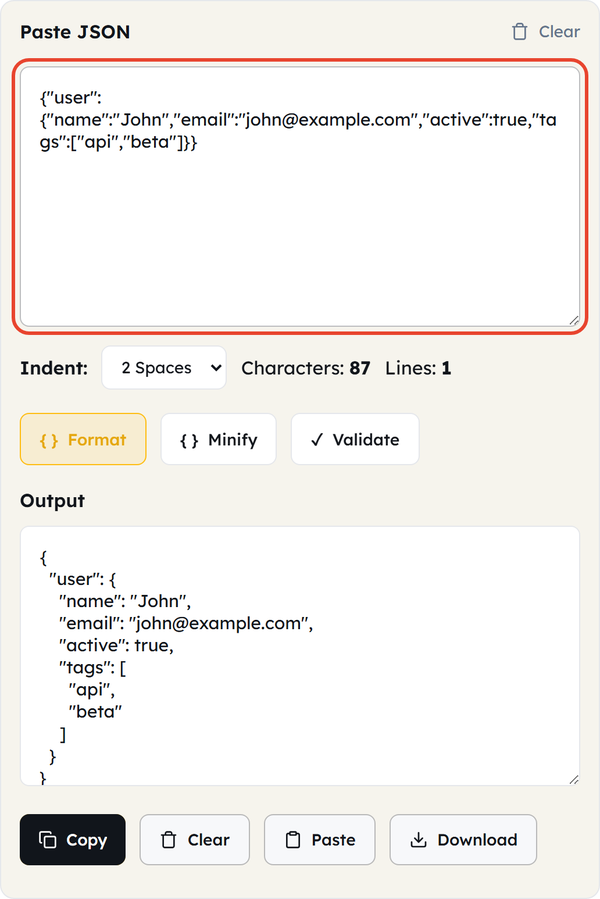
- Choose an indent — the Indent selector offers 2 Spaces, 4 Spaces, or Tab. Pick whichever matches your project’s style before you format.
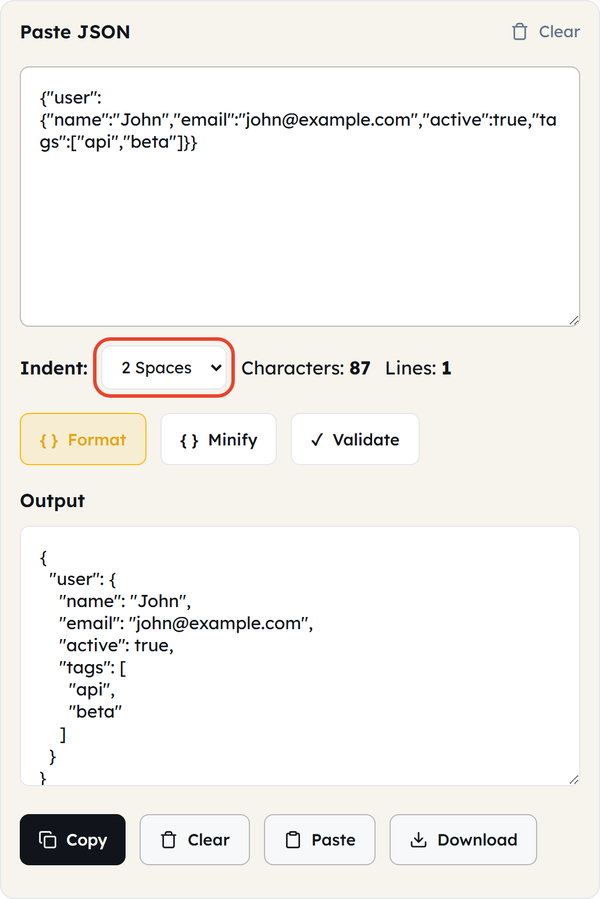
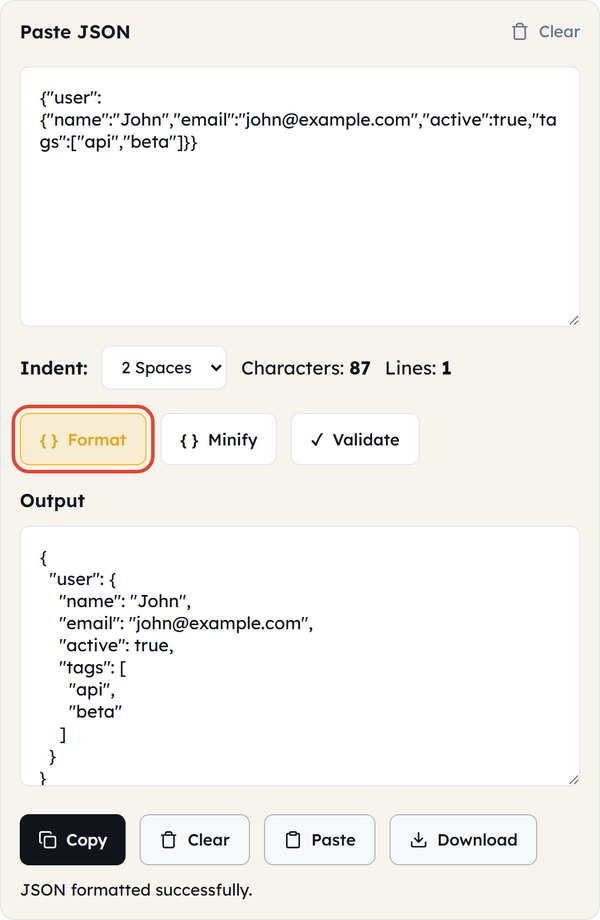
- Click Format — the indented JSON appears in the Output box and the status line confirms “JSON formatted successfully.” The Output box is read-only, so make any edits in the input box and format again.
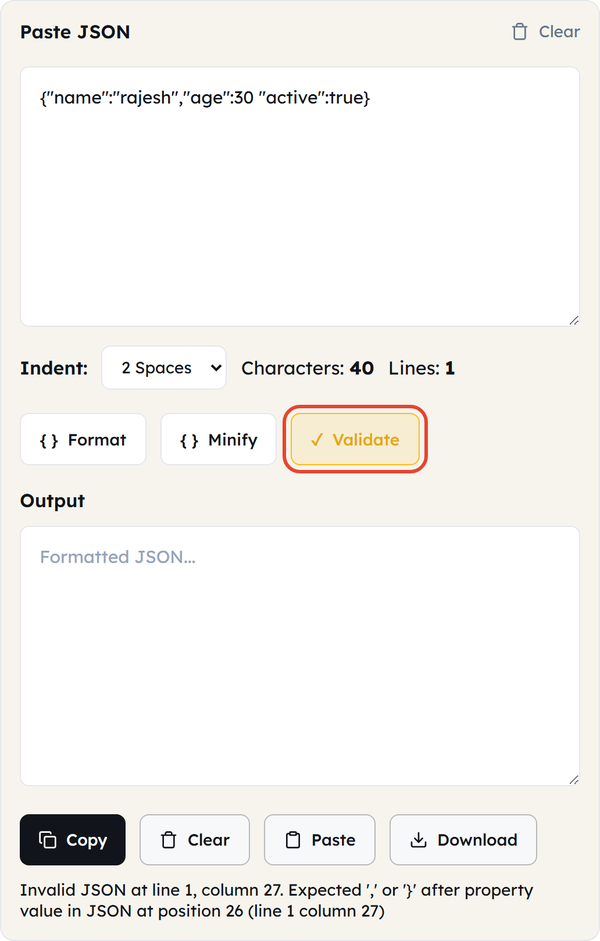
- Or minify and validate — Minify strips every unnecessary space and line break and returns the document on one line. Validate checks the syntax without reformatting: it answers “Valid JSON.” or points at the exact fault, for example “Invalid JSON at line 1, column 27.”
- Copy or download — click Copy to take the output to your clipboard, or Download to save it as formatted.json for your code, documentation, API testing, or configuration work. Clear empties both boxes when you are done.
What Is JSON?
JSON stands for JavaScript Object Notation. It is a lightweight, text-based format for storing and exchanging structured data, used widely in web applications and APIs. It represents information with objects, arrays, key-value pairs, strings, numbers, boolean values, and null, and it is relatively easy for both people and computers to read. A simple JSON document looks like this:
{
  "name": "rajesh",
  "age": 30,
  "active": true
}
What Is a JSON Formatter?
A JSON formatter converts JSON data into a more readable, structured layout. JSON is often written without indentation or line breaks, and even perfectly valid JSON is hard to read in that state, so a formatter rearranges the presentation without changing any of the information. For example:
Unreadable form:
{"user":{"name":"John","email":"john@example.com","active":true}}Readable form:
{
  "user": {
    "name": "John",
    "email": "john@example.com",
    "active": true
  }
}
When Would You Use This?
- Working with APIs — JSON carries most API requests and responses, and indentation makes nested data far easier to inspect.
- Debugging — readable indentation makes objects and arrays easier to follow when you are hunting for the problem.
- Web Development — frontend and backend developers meet JSON constantly in web applications and services.
- Configuration Files — formatting a JSON-based config file makes its settings easier to review and maintain.
- Database Data — content stored in or retrieved from a database as JSON becomes much easier to read.
- Testing — format JSON while preparing test requests, responses, or sample data.
- Documentation — formatted JSON examples are far easier for readers to follow when you are documenting an API or a project.
- Learning JSON — a formatter shows you visually how objects, arrays, and nested properties are structured.
- Troubleshooting API Responses — a large response returned as one long line becomes readable the moment it is formatted.
Do’s and Don’ts
Do’s
- Check that your input really is JSON before formatting it.
- Use indentation to make nested objects and arrays easier to understand.
- Use Validate when you want to know whether the syntax is correct, not just how it looks.
- Review the formatted output before using it in production.
- Keep important original JSON backed up separately.
- Use formatted JSON when preparing examples for documentation.
- Check property names, values, brackets, and commas when troubleshooting errors.
Don’ts
- Don’t assume formatting fixes invalid JSON — it reports the error, it does not repair it.
- Don’t remove or change data simply to make it look cleaner.
- Don’t paste sensitive production data into any tool without considering your organization’s security and privacy requirements.
- Don’t confuse JSON with JavaScript code.
- Don’t change values while formatting unless you intend to modify the data.
- Don’t assume every text file containing {} is valid JSON.
- Don’t rely on how the JSON looks to decide whether it is syntactically valid.
Good to Know
- JSON stands for JavaScript Object Notation.
- It is commonly used to exchange structured data between applications.
- JSON objects use curly braces {} and JSON arrays use square brackets [].
- Data is organized as key-value pairs, and property names are written in double quotes.
- JSON supports strings, numbers, boolean values, objects, arrays, and null.
- Standard JSON has no comment syntax.
- Whitespace and indentation do not change the meaning of valid JSON.
- A formatter changes how JSON is presented rather than what it contains.
- Badly formatted JSON may still be perfectly valid, and beautifully formatted JSON can still hold the wrong values.
- This tool formats, minifies, and validates, so you do not need three separate tools.
- You can format with 2 spaces, 4 spaces, or a tab.
- A validation error names the line and column of the fault, not just the fact that something is wrong.
- The Output box is read-only — edit the input and format again.
- Download saves the output as formatted.json.
- Everything runs in your browser; your JSON is never uploaded to a server.
- JSON is widely used in REST APIs, configuration files, web applications, and data exchange.
JSON Object vs JSON Array
Objects and arrays are the two structures you will meet most. An object is wrapped in curly brackets and holds key-value pairs; an array is wrapped in square brackets and holds an ordered list of values, which can themselves be objects. Knowing which you are looking at makes JSON much easier to work with, and formatting the document makes the difference obvious at a glance.
Formatted JSON vs Minified JSON
JSON is used in two forms. Formatted JSON uses indentation and line breaks, which makes it easy for people to read, debug, and document. Minified JSON removes every unnecessary space and line break so the payload travels as small as possible. Both represent exactly the same data in different visual forms.
This tool does both: Format expands the document, and Minify collapses it back onto a single line, so you can move between the two without leaving the page.
Common JSON Formatting Problems
You may run into any of these while working with JSON:
- Missing commas
- Extra commas
- Missing quotation marks
- Incorrect brackets
- Unclosed objects
- Unclosed arrays
- Single quotes used instead of double quotes
- Incorrectly structured nested objects
- Invalid values
- Unexpected characters
The tool locates the problem for you — it reports the line and column, for example “Invalid JSON at line 1, column 27” — but correcting the data is still your job.
JSON Formatting vs JSON Validation
The two are related but do different jobs. Formatting makes JSON easier to read by adding indentation and line breaks. Validation checks whether the JSON follows the required syntax at all.
When you are debugging an API request you usually want both, and it is worth remembering that valid syntax is not the same as correct content: JSON can pass validation and still carry the wrong values. Use Validate for the syntax and your own review for the data.
Frequently Asked Questions
What is a JSON Formatter?
What does JSON stand for?
JSON stands for JavaScript Object Notation.
How do I format JSON?
Paste your JSON into the Tool Flora JSON Formatter, choose an indent, and click Format. The formatted result appears in the Output box, ready to copy or download.
Can I choose the indentation?
Yes. The Indent selector offers 2 spaces, 4 spaces, or a tab, and the output is rebuilt the moment you format again.
Does formatting change my JSON data?
No. Formatting changes the presentation of the JSON, not the underlying values or structure.
Can I minify JSON here too?
Yes. The Minify button strips every unnecessary space and line break and returns the whole document on a single line.
Can I format minified JSON?
Yes. Formatting is most useful on JSON that has been compressed onto one line.
What is minified JSON?
Minified JSON is JSON with unnecessary whitespace, indentation, and line breaks removed.
How do I check whether my JSON is valid?
Click Validate. Valid input returns “Valid JSON.”, and invalid input returns the exact line and column of the problem, such as “Invalid JSON at line 1, column 27.”
Does a JSON Formatter fix invalid JSON?
No. Formatting and validation are different tasks. The tool tells you where the syntax error is, but you have to correct the data yourself before it will format.
Can I use the JSON Formatter for API responses?
Yes. Formatting an API response makes nested objects and arrays far easier to read.
Can I use it for JSON configuration files?
Yes. A formatter makes JSON configuration files easier to inspect and maintain.
Why is my JSON not working?
Common causes are missing commas, incorrect quotation marks, mismatched brackets, invalid values, or incorrectly structured objects and arrays. Validate points you at the line and column.
Why does JSON use double quotes?
Standard JSON syntax requires strings and property names to use double quotation marks. Single quotes make the data invalid JSON, which this tool reports as an error at the first offending character.
Can JSON contain comments?
Standard JSON has no comment syntax. If you are working with a particular JSON-based format, check whether that system provides its own extension.
What is the difference between JSON and JavaScript?
JSON is a data-interchange format with its own syntax rules. JavaScript is a programming language that can create, read, and manipulate JSON, but JSON itself is not JavaScript code.
Can JSON contain arrays and nested objects?
Yes. JSON supports arrays, arrays can hold values, objects, or other arrays, and objects can contain further objects and arrays.
Is JSON case-sensitive?
Yes. Property names and string values are case-sensitive, so “Name” and “name” are different properties.
Can I save the result to a file?
Yes. Download saves the contents of the Output box as formatted.json, and Copy puts it on your clipboard instead.
Is the JSON Formatter free, and do I need to install anything?
It is free and there is nothing to install. Tool Flora runs it in your browser, and your JSON is never sent to a server.
Related Tools

Hash Generator
Generate MD5, SHA-1, SHA-256, and more hashes.
- 100% Free
- Customizable
- Download
- Unlimited
URL Encoder
Escape and unescape URL components instantly.
- 100% Free
- Customizable
- Download
- Unlimited
HTML Encoder
Convert HTML entities to text and back.
- 100% Free
- Customizable
- Download
- Unlimited
JSON CSV Converter
Convert JSON arrays to CSV and back.
- 100% Free
- Customizable
- Download
- Unlimited

UUID Generator
Create unique UUIDs for apps and databases.
- 100% Free
- Customizable
- Download
- Unlimited
Timestamp Converter
Convert Unix timestamps to dates and back.
- 100% Free
- Customizable
- Download
- Unlimited