
A word counter is an online tool that gives you statistics about your content: words, characters, sentences, paragraphs, and reading time.
Word Counter
Count words, characters, sentences, paragraphs, and reading time.
Tool Flora provides a word counter tool for assignments, articles, or any specific content. Paste or type the text into the tool and get information such as word count, character count, sentences, paragraphs, and reading time. This helps you save a lot of time and maintain the size and structure of your content, whether you are a student, writer, blogger, content creator, or anyone else who wants to check the word limit of their content.
How to Use the Word Counter
It is an easy-to-use and straightforward tool.
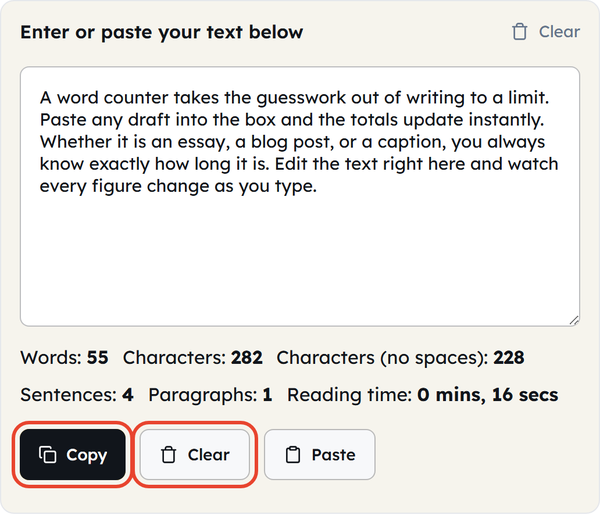
- Add your text — type or paste it straight into the text box, or click Paste to insert whatever is on your clipboard. It can be anything from a short paragraph to a longer article or document.
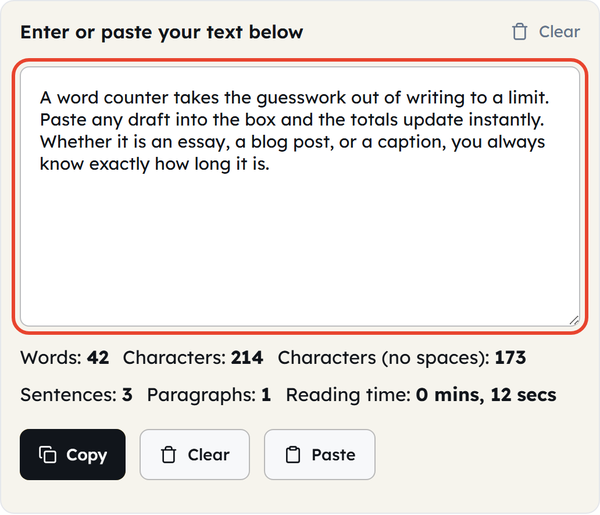
- Check your word count — there is no button to press; the tool analyses the text as you type, and the Words figure below the box updates instantly.
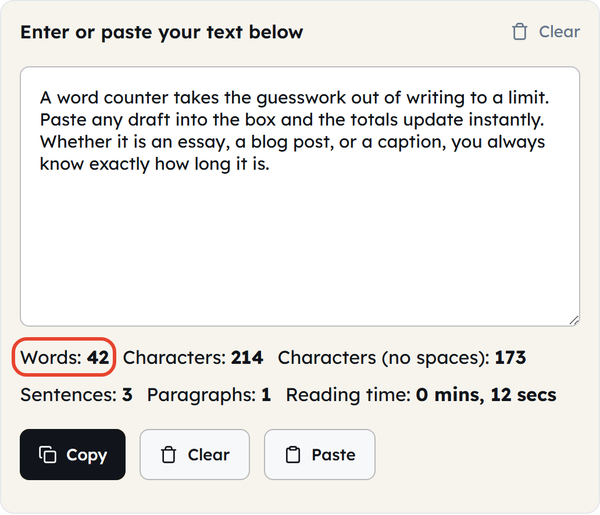
- Check characters and other details — the same row also shows Characters (with and without spaces), Sentences, Paragraphs, and an estimated Reading time, so you can review the structure of your content, not just its length.
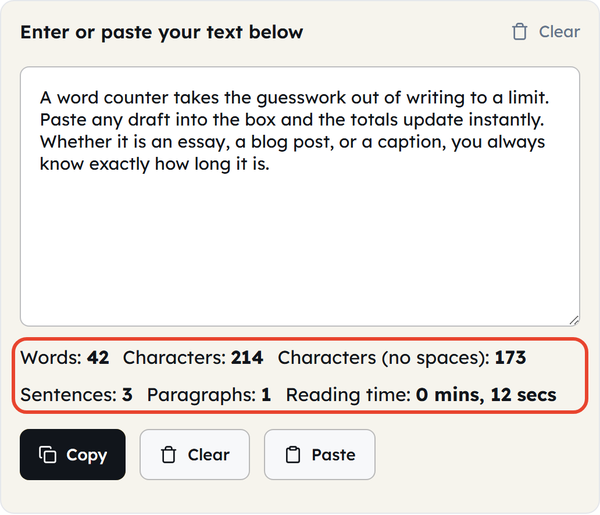
- Edit your text — make changes directly in the text area if the piece is too short or too long, and every figure updates as you type. When the length is right, click Copy to take the final text with you, or Clear to start on a new piece.
What Is a Word Counter?
A word counter helps you count the number of words and other details in a piece of text. Instead of manually counting words, you can use the tool to save you time. Statistics include character count, sentence count, paragraph count, and estimated reading time, which help you decide the size and structure of your content.
For example, if an assignment requires 1,000 words, you can paste text into the text area to track your progress.
When Would You Use This?
- School & College Assignments — a word counter can help you track your word limit, as students often have minimum or maximum word requirements.
- Blog Posts & Articles — writers and bloggers can use the tool to keep their content within the planned limit.
- SEO Content — content writers can check that a draft stays within the length set in the brief before submitting it.
- Social Media Content — most platforms limit posts by characters rather than words, and the character count here helps you stay inside those limits.
- Essays & Reports — just like assignments, this tool can help you stay within the requested word limit set by teachers, clients, or any organisation.
- Speeches and Presentations — check the length of your script, and use the reading time estimate to judge whether it is likely to fit in the given speaking time.
Do’s and Don’ts
Do’s
- Check the word limit before submitting.
- Use the character count within the tool if the platform is character-restricted.
- Review your content after editing to avoid any mistakes or changes in count.
- Review overall structure using paragraph and sentence counts.
- Keep the original document saved separately if the text is important.
- Check the requirements of the platform, assignment, or client before deciding what count you need to meet.
Don’ts
- Don’t expect every online word counter to count the same way.
- Don’t add unnecessary words to reach the intended word limit.
- Don’t compromise the quality of the writing for quantity.
- Don’t depend on word count to judge your writing.
- Don’t confuse character count with word count.
- Don’t assume that reaching the word limit automatically indicates your content meets all requirements.
Good to Know
- Word count tells you how many words are in the content, updated live as you type.
- Character count is shown both with and without spaces, which is useful for platforms with a character limit.
- Sentence count detects sentences from their end punctuation — full stops, question marks, and exclamation marks.
- Paragraph count treats every new line as a paragraph, so a list of short lines shows one paragraph per line.
- Reading time is estimated at a reading speed of about 200 words per minute.
- A slight variation in word count across online tools can occur because different rules are being followed, such as handling spaces, symbols, numbers, or punctuation.
- A word count tool can tell you about the quantity but cannot promise you the quality.
- If there is a maximum word limit, it is safer to finish a little below it than to land exactly on the cap.
- Always check the exact requirements when the piece you are working on is important or strictly assessed.
- Everything is counted in your browser — the text you type or paste is not uploaded to a server or stored.
Word Count vs. Character Count
Word count and character count measure different things with the same aim.
Word count tells you the number of words, while character count tells you the number of characters — letters, numbers, punctuation, and spaces. This tool shows characters both with and without spaces. Use word count for articles, essays, or assignments, and character count for platforms with strict character limits.
Why Is Word Count Important?
A word limit is usually there to keep writing focused and consistent. Tracking it helps students with their assignments and helps writers meet the length their clients asked for. Counting automatically also saves time and makes the whole process easier.
How to Reduce Your Word Count
If your draft is over the required word limit, start by removing repeated ideas, unnecessary introductions, filler phrases, and less valuable sentences. You can also combine shorter sentences, replace wordy phrases with simpler alternatives, and remove unnecessary modifiers. Aim to make your text shorter without compromising quality.
How to Increase Your Word Count
If you cannot reach the intended word limit, do not try to add meaningless sentences to increase the count. Instead, look for areas that deserve more explanation: expand an important point in detail, or provide supporting and connecting information. That is how you can increase the word count without compromising the quality.
Frequently Asked Questions
What is a Word Counter?
How do I use the Word Counter?
Paste or type your text directly into the text area; the tool analyses it automatically and displays the updated statistics as you type.
What can I use word count for?
You can use it for assignments, essays, blog posts, social media content, or anything in which you are required to track or alter the word count.
What is the difference between words and characters?
Words are single units of text, while characters are letters, numbers, spaces, and punctuation, counted based on the tool’s counting rules.
Is the Word Counter useful for SEO writing?
Absolutely — content writers can use this tool to monitor the length of their drafts. Word count alone doesn’t make content rank higher, though: the quality and usefulness of the content matter more than hitting a number.
Why does my word count differ from another tool?
Different applications have slight variations in their counting rules; that’s why small differences between tools are possible.
Is the Word Counter free?
Yes, Tool Flora provides an online word counter tool that you can use directly in your browser for free.
Related Tools

Sentence Counter
Count sentences and average length as you type.
- 100% Free
- Customizable
- Download
- Unlimited
Paragraph Counter
Measure paragraphs and structure at a glance.
- 100% Free
- Customizable
- Download
- Unlimited
Case Converter
Convert text between upper, lower, title, and more.
- 100% Free
- Customizable
- Download
- Unlimited
Remove Extra Spaces
Clean double spaces and tidy whitespace fast.
- 100% Free
- Customizable
- Download
- Unlimited
Remove Line Breaks
Flatten text by stripping unwanted line breaks.
- 100% Free
- Customizable
- Download
- Unlimited
Remove Duplicate Lines
Deduplicate lines while preserving order.
- 100% Free
- Customizable
- Download
- Unlimited