
A QR code generator turns the information you enter into a QR code that can be scanned with a compatible device.

QR Code Generator
Turn any text, link or contact detail into a QR code, tune its size and error correction, then download it as a PNG.
Tool Flora’s QR code generator turns text, links, contact details and other information into a scannable QR code — a quick way to hand something over without anyone having to type it out or search for it.
Making one takes seconds: enter your information, choose how robust and how large the code should be, then download it as a PNG and scan it with any compatible phone or reader. Whether it ends up on a website, a poster or a business card, it turns something printed into something a tap away.
How to Use the QR Code Generator
It takes a few short steps, and the code redraws itself as you type — there is no Generate button to press.
Enter Your Information
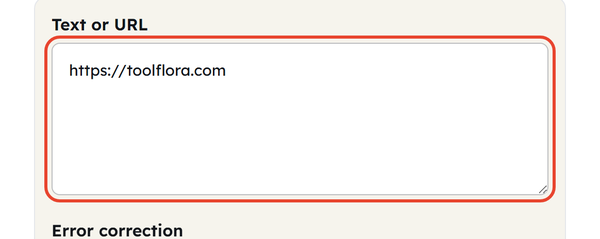
Type or paste what you want to encode into the Text or URL box — a web address, plain text, an address, contact details, or anything else you want people to reach.
Choose Error Correction and Size
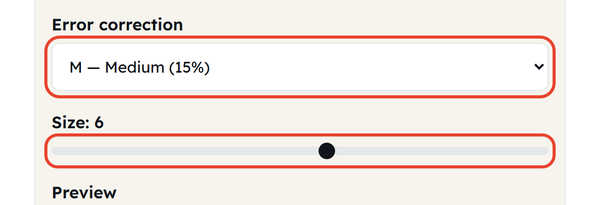
Pick an Error correction level — L (7%), M (15%), Q (25%) or H (30%) — and drag the Size slider anywhere from 1 to 10. Higher error correction lets a scuffed or partly covered code still scan; a larger size gives you a bigger PNG to print.
Check the Preview
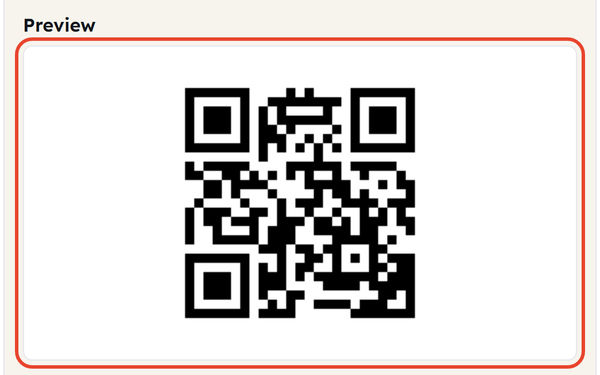
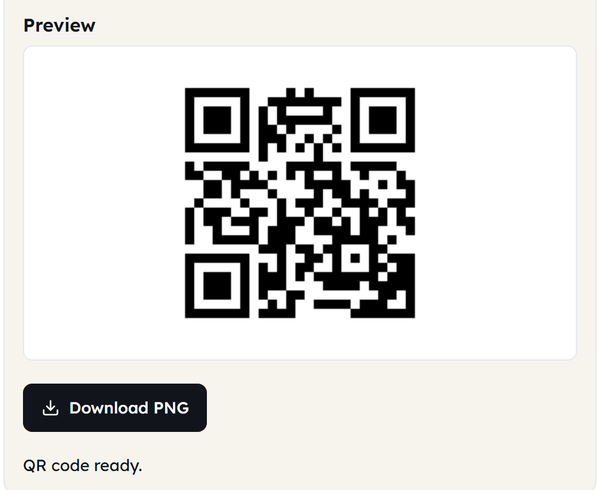
The Preview panel updates as you type. Check the code has appeared and that what you entered is correct before you go any further.
Download the PNG
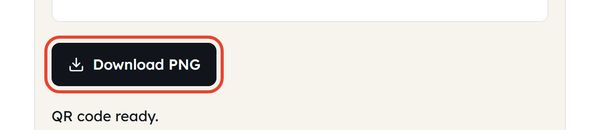
Click Download PNG to save the code to your device, then use it wherever you need it — documents, posters, cards, presentations or product labels.
Test It Before Sharing
Always scan the downloaded code with a phone before printing or distributing it. That is the only way to be sure it reads cleanly and lands on the right information.
What Is a QR Code?
A QR code (quick response code) is a 2-dimensional barcode that stores information in a black-and-white pattern of squares, unlike a traditional barcode, which stores information in one direction.
Whenever someone scans it using a compatible smartphone or scanner, the encoded information can be read and displayed. For example, without manual searching, anyone can find the website by scanning the QR code that contains the website address.
QR codes are now commonly used for websites, menus, payments, contact details, event information, WiFi access, and many other purposes.
When Would You Use This?
Share a Website
Create a QR code for your website or webpage so people can land directly on it from the QR code.
Business Cards
Add a QR code to a business card to give people access to your website, contact, or professional profile.
Posters and Flyers
Use a QR code on promotional materials for offline use to connect with your online world.
Restaurant Menus
A QR code can provide a quick way for customers to open a digital menu directly from their smartphones.
Events
Use QR codes to share event details, registration pages, schedules, locations, or other useful information.
Presentations
Add a QR code to your presentation to give the audience access for better clarity and clarification.
Product Packaging
Businesses can use QR codes on packaging to direct customers to their product information, instructions, websites, or support pages.
Educational Materials
Teachers and students can use QR codes to connect printed worksheets, posters, or classroom materials with online resources.
Sharing Contact Information
A QR code can provide a convenient way to share contact information without manual typing.
Do’s and Don’ts
Do’s
- Always check the information before creating a QR code.
- Test the generated QR code before printing or publishing it.
- Ensure the perfect scannable size of the QR code.
- Keep the surrounding space empty around the QR code.
- Make the QR code clear and high-quality when printing.
- Ensure the destination link works perfectly before sharing it.
- Place the QR code somewhere where it is clearly visible to the crowd.
Don’ts
- Don’t print the QR code without testing.
- Don’t use an extremely small QR code that can’t be seen from a distance.
- Don’t make the QR code messy or covered.
- Don’t place it on a background that makes it difficult to see.
- Don’t send people to a broken or incorrect link.
- Don’t assume that generating a QR code automatically verifies the information it contains.
- Don’t make the QR code the only way to access information where an alternative option works better than a QR code.
Good to Know
- QR code is a short form of Quick Response.
- A QR code can hold a web address, plain text, contact details and more, depending on what you encode.
- A QR code can be scanned using many modern smartphones without requiring a separate QR scanner.
- The pattern gets denser the more information it contains, and denser again at a higher error correction level.
- Always test the QR code before printing it in large numbers.
- A QR code does not make the website secure. Always verify the destination before entering secure information.
- QR codes can be used in both digital and offline materials.
- Small size, blurriness and poor contrast against the background are what usually make a code unscannable. Error correction buys you tolerance for damage, not for a code printed too small.
- Check the website address before distributing the code.
- Keep the text or URL behind an important QR code so you can regenerate it if the file is lost.
Static QR Codes vs Dynamic QR Codes
These are the two types of QR code worth knowing apart.
A static QR code stores information directly in the code and cannot be changed after printing it; meanwhile, a dynamic QR code usually points to a web address that can be managed by a service that allows the destination link to be updated, depending on the service.
If you only need to share information that won’t change, a simple static QR code can be effective, and if you need a QR code where you need to update the link regularly, a dynamic QR code is useful.
Where Can You Put a QR Code?
QR codes work well in plenty of places, including:
- Business cards
- Posters
- Flyers
- Brochures
- Menus
- Product packaging
- Event invitation
- Presentations
- Classroom materials
- Signs and displays
- Printed instructions
- Digital documents
Make your QR code visible and clear to your audience.
How to Make a QR Code Easy to Scan
A QR code works best when the whole pattern is visible to whoever is scanning it. Keep strong contrast between the code and its background, leave nothing sitting on top of it, and give it a clear margin so it stands out from everything around it.
A sensible size and a clean, high-resolution file matter just as much when you print it — and most importantly of all, test the finished code before you distribute it.
Frequently Asked Questions
What is a QR Code Generator?
What can I use a QR code for?
You can use QR codes to share website links, text, contact information, event details, digital resources, menus, product information and many other types of information.
How do I create a QR code?
Enter what you want to encode in the Text or URL box and the code appears in the Preview panel straight away — there is no Generate button to press. Adjust the error correction and size if you want to, then click Download PNG.
What do the error correction levels mean?
They set how much of the code can be damaged, dirty or covered and still scan — L tolerates about 7%, M 15%, Q 25% and H 30%. A higher level packs more redundancy into the pattern, so the squares get finer for the same amount of data.
Do QR codes expire?
A basic QR code does not expire. If the code points to a website or a service, though, the destination can stop working or change over time.
Do I need an app to scan a QR code?
Most modern smartphones read QR codes with the built-in camera or from the operating system, so usually not — though it depends on the device.
Why isn’t my QR code scanning?
There are several usual causes: the code is too small, blurry, damaged, poorly contrasted, partly covered, or displayed in a way the scanner cannot read.
Are QR codes safe?
A QR code is only a way of encoding information. What it points to might still be an unsafe or misleading website, so check the destination before you act on it.
Related Tools
Stopwatch
Track elapsed time with lap support.
- 100% Free
- Customizable
- Download
- Unlimited
Countdown Timer
Set a countdown for tasks and reminders.
- 100% Free
- Customizable
- Download
- Unlimited
Pomodoro Timer
Stay focused with classic Pomodoro sessions.
- 100% Free
- Customizable
- Download
- Unlimited

Notepad
Quick notes that stay in your browser.
- 100% Free
- Customizable
- Download
- Unlimited
Coin Flip & Dice
Flip a coin or roll dice for quick decisions.
- 100% Free
- Customizable
- Download
- Unlimited