
Any text that ends with a line break — anything you end by pressing Enter or Return — whether it is a full sentence or a single word.
Line Counter
Count total, blank, and non-blank lines instantly as you type.
Counting lines by hand — in a list, a log file, a script, or a document with a strict length requirement — is tedious and easy to get wrong. This text line counter gives you an instant, accurate breakdown the moment you paste your text.
Use the line counter online with no sign-up, no downloads and no limit on how much text you can check — and nothing you paste ever leaves your browser.
How to Use the Line Counter
- Type your text into the box, or paste it in.
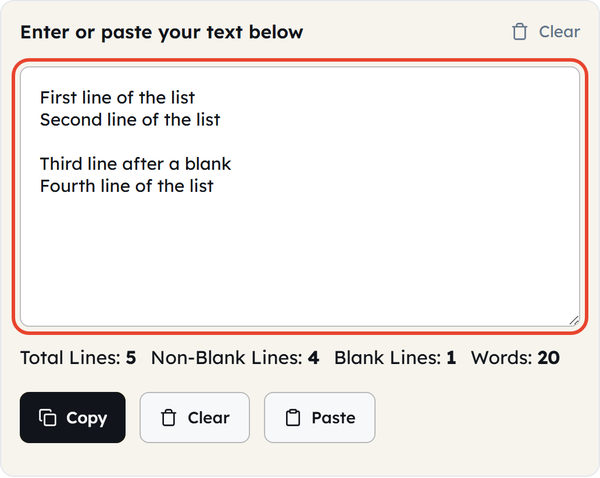
- Watch the four counts under the box update as you go: Total Lines, Non-Blank Lines, Blank Lines and Words.
- Click Copy to take the text back out, or Paste to pull text straight from your clipboard.
- Click Clear to empty the box and start again.
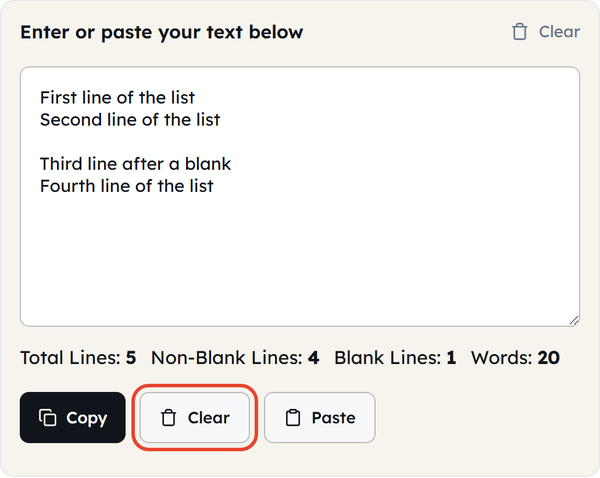
Because you count lines online here rather than in an editor, every count updates in real time as you type, with no separate calculate step.
What Is a Line Count?
A line count is the number of lines in a piece of text, where a “line” is whatever sits between one line break and the next. To count lines of text accurately you therefore have to count line breaks, not the rows you see on screen. Unlike a word or character count, it measures structure — how the text is broken up — rather than length.
This tool breaks that structure down into four numbers:
- Total Lines: All lines of your text, including blank lines, counted by each line break.
- Non-Blank Lines: Only lines that contain visible text or characters (blank spacer lines are excluded).
- Blank Lines: Empty lines used for spacing or paragraph breaks.
- Words: The total word count across all lines combined.
Common Use Cases for a Line Counter Tool
- Checking how many lines a snippet of code or a configuration file runs to.
- Verifying that a list has as many entries as you expect — addresses, names or SKUs.
- Writing a resume, cover letter or application that has to fit a set number of lines.
- Checking a log file or an export for unexplained blank lines.
- Formatting poetry or lyrics, where the line and stanza count is the point.
- Auditing pasted content for stray blank lines before you publish it.
Line Counter Do’s & Don’ts
| Do | Don’t |
|---|---|
| Use Non-Blank Lines when you want to ignore spacer lines. | Assume Total Lines and Non-Blank Lines will be the same number. |
| Paste code in as it is — the count follows the real line breaks. | Mistake a line that visually wraps on screen for a second line. |
| Check the line count as well as the word count on resumes and letters. | Ignore trailing empty lines — they still count towards the total. |
Line Counting: What You Need to Know
- A line break is not the same as text wrapping at the edge of the screen or page. A line break is what you add by pressing Enter or Return.
- Copying out of a PDF or a web page often produces a higher line count than the source file had, because the layout adds its own breaks.
- The gap between Total Lines and Non-Blank Lines tells you at a glance how many blank lines a document is carrying.
- Blank lines at the very start or end of pasted text are counted in the total even though they are hard to spot on screen — a stray line break after your last word adds one.
Standard Line Count Guidelines by Document Type
Line-count expectations vary a lot by the type of writing. Some rough standards:
| Context | Typical Line Guidance |
|---|---|
| Resume (1-page) | Approximately 40-50 lines (varies with font size and margin). |
| Cover letter | Generally not more than 40-45 lines per page. |
| Sonnet (poetry) | Exactly 14 lines by definition. |
| Haiku | A traditional 3-line verse in 5-7-5 syllables. |
| Git commit message | Typically wrapped at 72 characters per line for ease of reading on terminals. |
| CSV/data file row | One line per record, plus the header row if the file has one. |
These are guidelines rather than rules — always check against whatever actually governs the job in hand, whether that is a job advert, a house style guide or a platform’s formatting limits.
More Related Text Counting Tools
- Word Counter (https://toolflora.com/text-and-writing/word-counter/) — words, characters and reading time alongside your line count.
- Character Counter (https://toolflora.com/text-and-writing/character-counter/) — for social post limits, meta descriptions and form fields.
- Find and Replace (https://toolflora.com/text-and-writing/find-replace/) — to clean up and standardise text before you count the lines.
Frequently Asked Questions
What counts as a line in this tool?
Does an empty line still count?
Yes, towards Total Lines and Blank Lines. It is the only one of the four counts left out of Non-Blank Lines.
Does the tool count wrapped text as multiple lines?
No. A long line that visually wraps onto a second row on your screen is still one line — the count is decided by line breaks, not by how the text looks.
Can I use this for counting lines of code?
Yes. Paste in any code snippet and it counts every line exactly as it appears, including the blank lines you use to separate functions or blocks.
Will the line count change if I paste the same text on a different device?
No. The tool reads Windows, Mac and Linux line breaks the same way, so the count stays consistent wherever the text came from.
Does deleting a blank line at the end of my text change the word count?
No. Blank lines contain no words, so removing one changes your line counts but leaves the word count exactly where it was.