
A flat array of objects that share the same keys, for example [{“id”:1,”name”:”Alice”},{“id”:2,”name”:”Bob”}]. An object wrapping an array, such as {“users”: […]}, is not unwrapped — it converts to a single users column.
JSON ↔ CSV Converter
Convert JSON arrays to CSV and CSV back to JSON instantly.
JSON and CSV solve different problems. JSON holds hierarchical, nested data and suits APIs and config files; CSV is flat and tabular and suits spreadsheets. Moving data between them is not just reformatting, it is restructuring. This tool runs in your browser and converts a JSON array into CSV for Excel or Google Sheets, and CSV rows back into a JSON array.
How to Use the JSON ↔ CSV Converter
- Choose a direction: JSON to CSV or CSV to JSON. The Mode line under the buttons confirms which way it is running.

- Type or paste your input into the Input box.
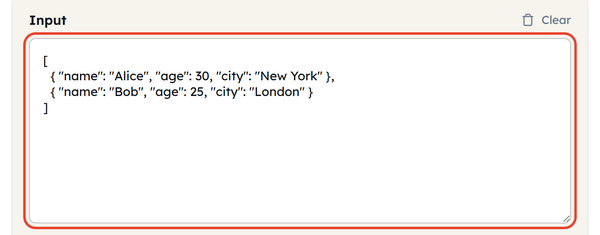
- The Output box fills in as you type — there is no Convert button to press.
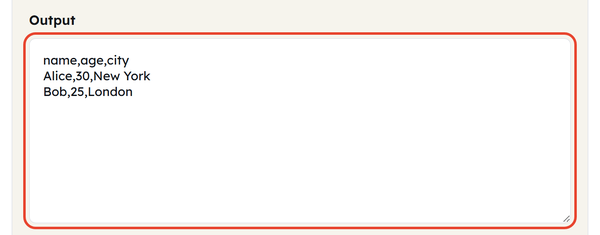
- Click Copy to take the result, or Download to save it as converted.csv or converted.json.

- Click Paste to pull data in from your clipboard, or Clear to start again.

- All of it happens in your browser — nothing is uploaded to a server.
- Bad input is reported inline rather than failing silently: paste [{“a”:1,] and the tool answers with the parser’s own message.
What Is JSON ↔ CSV Conversion?
- Convert an array of objects into an array of CSV rows by using JSON to CSV: each object becomes a row, each property becomes a column.
- CSV to JSON turns each row into a JSON object, using the header row for the property names.
- The shape this tool wants is a flat array of objects. A single object works too, as one row — but an object wrapping an array, such as {“users”: […]}, is not unwrapped, and you get a single users column instead.
- The output is always comma-delimited — there is no delimiter setting. If your spreadsheet expects semicolons, set that in its own import dialog rather than looking for an option here.
- CSV has no concept of nesting, so anything nested has to be represented some other way when it crosses over.
How Nested JSON Is Handled
- This is the part most explanations skip, and it decides whether your output is usable:
- Plenty of converters flatten nested objects into dot-notation columns. This one does not: {“address”: {“city”: “NYC”}} becomes a single address column holding the JSON text {“city”: “NYC”}, not an address.city column with NYC in it.
- Nested arrays go the same way. There is no way to spread a list across one cell, so {“tags”: [“x”,”y”]} lands in a tags column as the JSON text [“x”,”y”].
- So both kinds of nesting behave identically here: the value survives intact, but as JSON text inside one cell rather than as columns you can sort or filter on.
- If you need nested values as columns of their own, flatten the JSON before you paste it in — or split the JSON text back out in the spreadsheet afterwards.
When You’d Use This
- Export API response data to a spreadsheet for analysis, reporting or to share non-technical stakeholders.
- A CSV file exported from an Excel or Google spreadsheet to a JSON file for use in an app or script.
- Creating a JSON configuration or log data to view on a spreadsheet application
- Converting form or survey CSV data to structured JSON for a database or API.
- Rapidly scanning the form of nested API data as readable columns
- Copying data from one system to another, with different one expecting JSON and the other expecting CSV.
Worked Example
JSON to CSV: Input:
[
  { "name": "Alice", "age": 30, "city": "New York" },
  { "name": "Bob", "age": 25, "city": "London" }
]
Output:
name,age,city
Alice,30,New York
Bob,25,London
CSV to JSON: Input:
name,age,city
Alice,30,New York
Bob,25,London
Output:
[
  { "name": "Alice", "age": "30", "city": "New York" },
  { "name": "Bob", "age": "25", "city": "London" }
]
CSV has no notion of data types, so numbers come back from a CSV to JSON conversion as strings unless the receiving system converts them.
Nested input behaves differently again: [{“name”:”Ada”,”address”:{“city”:”NYC”}}] converts to the two columns name,address — with the whole address object sitting in one cell as JSON text, not as an address.city column.
Do’s and Don’ts
Do:
- Use a flat array of objects as the JSON input — it is the shortest route to a clean CSV.
- Check what delimiter your spreadsheet expects before importing. This tool always writes commas, so a semicolon locale needs the delimiter set in the import dialog.
- Check the header row before a CSV to JSON conversion — those headers become your JSON property names verbatim.
- Expect nested objects and nested arrays alike to arrive as JSON text inside a single cell.
Don’t:
- Assume nested values will be split across rows or columns — nothing is split, in either direction.
- Forget that CSV values are always text — if your application needs real numbers and booleans, convert them back after a CSV to JSON pass.
- Mix different keys across the objects in your JSON — you get a column for every key that appears anywhere and blank cells wherever one is missing.
- Worry about commas inside your values — anything containing a comma, a quote or a line break is wrapped in double quotes for you automatically.
Common Mistakes
- Inconsistent object keys — if the objects in your array do not share the same keys, the CSV gets a column for every key that appears anywhere and a blank cell wherever one is missing.
- Assuming types survive the round trip — they do not. Send the number 30 out to CSV and back and it returns as the string “30”, because CSV stores everything as text.
- Ignoring a delimiter mismatch — opening a comma-delimited file in a spreadsheet set to semicolons drops everything into one column, and pasting a semicolon file into CSV to JSON here gives you one key holding the whole row.
- Not accounting for nested arrays — expecting a list inside a JSON object to become several CSV rows. It will not; it arrives as JSON text in a single cell.
Good to Know
- The default CSV output will be in RFC 4180 format, which means that any value containing a comma, a quote, or a line break is enclosed in double quotes to ensure it is valid in a CSV file.
- If the columns look misaligned, check your locale: some Excel and spreadsheet locales expect a semicolon rather than a comma, and this tool always writes commas.
- A single JSON object, not wrapped in an array, still converts — as a one-row table with its top-level keys as the header.
- Conversion here runs both ways in the same place, where many converters handle only one direction.
- Numbers and booleans lose their type on the way into CSV, so you may need to convert them back by hand downstream.
FAQ
What JSON structure works best in this converter?
What happens to nested objects and arrays?
Both are serialised as JSON text inside one cell. A nested object does not become dot-notation columns here, and a nested array is not spread across rows or columns.
Does converting CSV to JSON preserve number and boolean types?
No. CSV is plain text, so numbers and booleans come back as strings. Convert them to their proper types afterwards if your application needs them.
Can I choose a different delimiter, such as a semicolon?
No. The converter reads and writes commas only. A semicolon-separated file pasted into CSV to JSON returns a single key holding the whole row, so convert it to commas first, or set the delimiter in your spreadsheet’s own import dialog.
Can I convert a single JSON object instead of an array?
Yes. One object becomes one row in the CSV table, with its top-level keys as the columns.
Is my data uploaded anywhere during conversion?
No. Nothing you paste is sent to a server — the whole conversion runs in your browser.
Related Tools
Base64 Encoder
Encode or decode Base64 strings safely.
- 100% Free
- Customizable
- Download
- Unlimited

Hash Generator
Generate MD5, SHA-1, SHA-256, and more hashes.
- 100% Free
- Customizable
- Download
- Unlimited
URL Encoder
Escape and unescape URL components instantly.
- 100% Free
- Customizable
- Download
- Unlimited
HTML Encoder
Convert HTML entities to text and back.
- 100% Free
- Customizable
- Download
- Unlimited
UUID Generator
Create unique UUIDs for apps and databases.
- 100% Free
- Customizable
- Download
- Unlimited
Timestamp Converter
Convert Unix timestamps to dates and back.
- 100% Free
- Customizable
- Download
- Unlimited