
The JavaScript (ECMAScript) engine — the same one your browser and Node.js run. Most patterns transfer straight to other engines such as PCRE, though a few advanced features differ.
Regex Tester
Test regular expressions against text and inspect matches.
What the Regex Tester Does
Regular expressions are precise, but they are not forgiving — one missing escape character or one misplaced quantifier is the difference between a perfect match and no match at all. This regex tester runs your pattern against real text as you type, highlighting every hit in a live preview and listing each match with its index, its length and its capture groups. Nothing has to be deployed just to find out whether the pattern works.
How to Use the Regex Tester
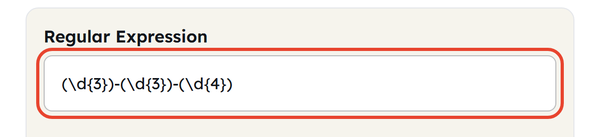
- Type your pattern into the Regular Expression field — no surrounding slashes are needed.
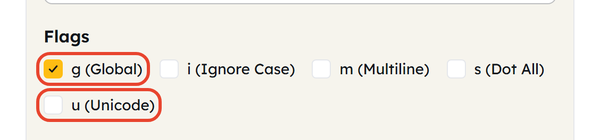
- Tick the flags you need: g (Global), i (Ignore Case), m (Multiline), s (Dot All) and u (Unicode). g is already ticked when the page loads.
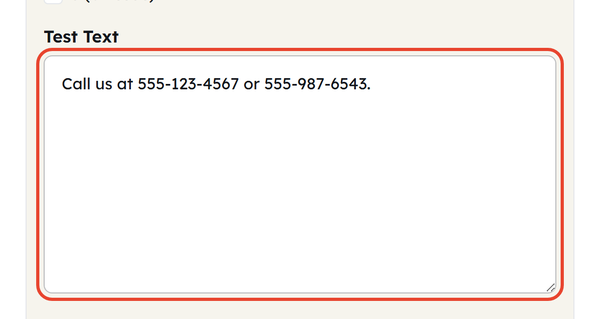
- Paste or type your sample text into the Test Text box.
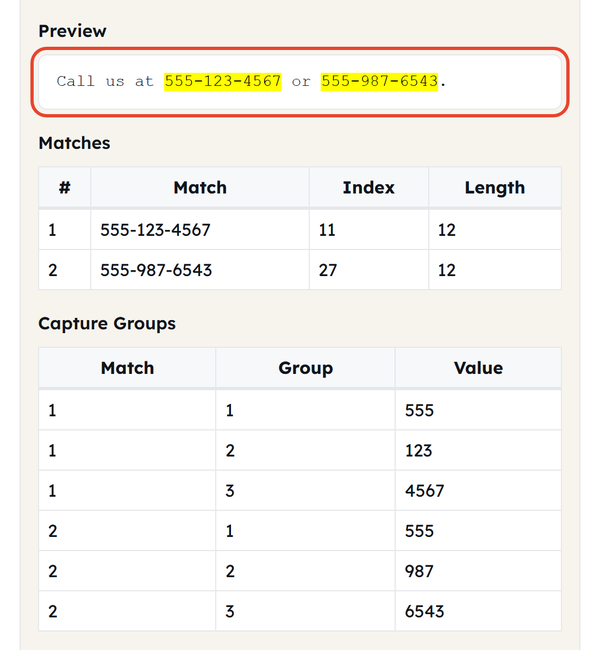
- Matches highlight in the Preview panel as you type, and the Matches table lists every hit with its index and length. Capture Groups breaks each match into its bracketed parts.
- Change the pattern or the flags and the results update instantly. Copy Matches sends the results table to your clipboard; Clear empties the pattern, the test text and the flags.
No pattern or text is sent to a server — everything runs client-side in your browser on the standard JavaScript regex engine.
What Is a Regular Expression?
- A regular expression (regex) is a string of characters that forms a pattern, used for matching, searching, or replacing text.
- Patterns mix literal characters with metacharacters:. matches any character, * matches zero or more, + matches one or more, and ? makes the item before it optional.
- Character classes such as [a-z] or \d (digits) match any single character drawn from a known set.
- Groups — the parts wrapped in parentheses () — capture a piece of the match so it can be pulled out on its own.
- Flags change how the whole pattern behaves: g finds every match instead of only the first; i ignores letter case; m makes ^ and $ match the start and end of each line rather than of the whole string; s lets. match newline characters; u switches on full Unicode handling.
- The tool uses the regex engine built into JavaScript (ECMAScript) — the same one your browser and Node.js run. Most patterns port straight across to engines such as PCRE, but a few constructs, lookbehind among them, behave differently from one flavour to the next.
Common Regex Patterns
The handful of tokens you will reach for again and again, whatever the job:
- \d — any digit (0-9)
- \w — any word character (letter, digit or underscore)
- \s — any whitespace character: space, tab or newline
- ^ — start of the string (or of each line, with the m flag)
- $ — end of string (or line, with the m flag)
- . — any single character (newlines excluded, unless the s flag is on)
- [abc] — matches a, b or c; [^abc] — matches anything that is not a, b or c
- (…) — a capture group
- a{2,4} — repeated at least 2, but no more than 4 times
- a|b — matches either a or b
When You’d Use This
- Ensuring that incoming data from forms, such as email addresses, phone numbers or postal codes, is formatted correctly before user data is accepted.
- Working out why a regular expression in your code is not matching the text you expected it to.
- Identifying specific information like dates, prices or IDs in unstructured text or logs
- Creating a find-and-replace pattern to use with a large file or large dataset
- Discovering the syntax of regex patterns through experimentation with small patterns and sample text, and obtaining immediate feedback
- Running the pattern in various combinations of flags to make sure it’s performing as desired before putting it into production code.
Worked Example
Pattern: (\d{3})-(\d{3})-(\d{4}) Flags: g Test text: Call us at 555-123-4567 or 555-987-6543.
Total Matches: 2 — 555-123-4567 at index 11 and 555-987-6543 at index 27, both 12 characters long.
The pattern looks for three digits, a hyphen, three more digits, a hyphen and then four digits — the usual US phone-number format. The g flag makes the tool report both occurrences instead of stopping at the first, and the three bracketed groups split each number into 555, 123, 4567 and 555, 987, 6543 in the Capture Groups table.
Do’s and Don’ts
Do
- Test edge cases (happy path is not enough): empty strings, extra whitespace, and unexpected characters.
- Tick the g flag whenever the text can hold more than one match.
- Escape special characters (. + ? ( ) [ ] { } | ^ $ \) with a backslash when you want them matched literally
- Keep patterns as simple as the job allows — a clever pattern is a hard pattern to debug six months later.
Don’t
- Do not assume that a feature supported by another engine, PCRE for instance, works the same way here — this tester runs the JavaScript engine, and some constructs behave differently or are missing entirely.
- Do not forget the g flag and then wonder why only the first match is listed.
- Do not lean on regex for work it was never meant for, such as matching balanced HTML or other deeply nested, recursive structures.
- Do not ignore performance on very large inputs — a pattern with several nested quantifiers can crawl, or hang, on the wrong text.
Common Mistakes
- Forgetting the g flag: without it the tool reports only the first match, which reads as though the rest of the text simply does not match.
- Unescaped special characters: an unescaped. or + is read as “any character” or “one or more” instead of the literal character you meant.
- Greedy versus lazy quantifiers: greedy quantifiers take as much text as they can and lazy ones stop at the first valid match, so reaching for the wrong one is the usual cause of over-matching.
- Anchors without the m flag: ^ and $ anchor to the whole string rather than to each line, so a per-line pattern quietly matches once, or not at all, until m (Multiline) is ticked.
Good to Know
- Regex behavior is not entirely uniform: JavaScript, PCRE (used in PHP and other tools), and Python’s re module have minor differences in syntax and functionality.
- Lazy quantifiers (*?, +?): These attempt to match as little text as possible before backtracking. Greedy quantifiers: These attempt to match as much text as possible before backtracking.
- Patterns that are very complicated and contain nested repetition may experience catastrophic backtracking, meaning that on some inputs they may run very slowly — simpler, more specific patterns are typically more resilient.
- Capture groups can be numbered — (…) — or named — (?<name>…). Named groups work here, but the Capture Groups table lists them by position rather than by name.
- Regex suits flat, predictable text; HTML and deeply nested JSON are better handled by a dedicated parser.
- A broken pattern does not fail silently — the Status line prints the JavaScript engine’s own message, for example “Invalid regular expression: /([a-z/gu: Unterminated character class”.
FAQ
What flavour of regex does this tool use?
Why does my pattern only match once?
Tick the g (Global) flag. Without it the engine stops at the first match instead of scanning the rest of the text.
What is the difference between greedy and lazy matching?
Greedy quantifiers (* and +) take as much text as they can; lazy quantifiers (*? and +?) take as little as possible. Both are valid — which one you want depends on where the match should stop.
Can I test patterns here that I will use in PHP or Python?
For core syntax, yes — most of it is shared. Always confirm in the real target environment, because features such as lookbehind and Unicode property escapes vary between flavours.
Why does ^ not match the start of every line?
By default ^ and $ anchor to the start and end of the whole string. Tick the m (Multiline) flag and they match at the start and end of each line instead.
What do the Index and Length columns mean?
Index is the zero-based position in the test text where the match begins, and Length is how many characters it spans. Copy Matches puts that same table — match, index and length — on your clipboard.
Is my pattern or test text sent anywhere?
No. Everything runs inside your browser and nothing is uploaded, logged or stored — watching the network while typing shows no requests leaving the page.
Related Tools
Base64 Encoder
Encode or decode Base64 strings safely.
- 100% Free
- Customizable
- Download
- Unlimited

Hash Generator
Generate MD5, SHA-1, SHA-256, and more hashes.
- 100% Free
- Customizable
- Download
- Unlimited
URL Encoder
Escape and unescape URL components instantly.
- 100% Free
- Customizable
- Download
- Unlimited
HTML Encoder
Convert HTML entities to text and back.
- 100% Free
- Customizable
- Download
- Unlimited
JSON CSV Converter
Convert JSON arrays to CSV and back.
- 100% Free
- Customizable
- Download
- Unlimited

UUID Generator
Create unique UUIDs for apps and databases.
- 100% Free
- Customizable
- Download
- Unlimited