
URL encoding converts characters into a percent-encoded form so they can be carried safely in a URL. Each unsafe character is replaced by a % followed by its hexadecimal value.
URL Encode / Decode
Encode or decode URL strings with optional full-URL mode.
A URL encoder converts a URL, or one part of a URL, into percent-encoded form so that spaces, reserved characters and other unsafe characters are represented correctly inside a URL or URI component. Tool Flora’s free URL Encoder does it in the browser, with nothing to install and nothing to sign up for.
Percent-encoding is also called URL encoding; it converts characters with special meanings in the URL into % and hexadecimal values. For instance, a space will be replaced by %20 and the & will be replaced by %26.
What Is a URL Encoder?
A URL Encoder is an online tool that rewrites characters into a URL-safe format. Characters such as =, +, /, #, ? and & are reserved, because inside a URL they carry a structural meaning. Encoding them keeps them from being mistaken for that structure.
For example:
Original text:
hello world & welcome
Encoded text:
hello%20world%20%26%20welcome
Text is normally encoded when it goes into a query parameter, form data, a generated link or a request made by a web application.
How to Use the Tool Flora URL Encoder
The URL Encoder is easy to use:
- Type or paste your text, URL or URL component into the Input box, or press Paste to pull it straight from your clipboard.
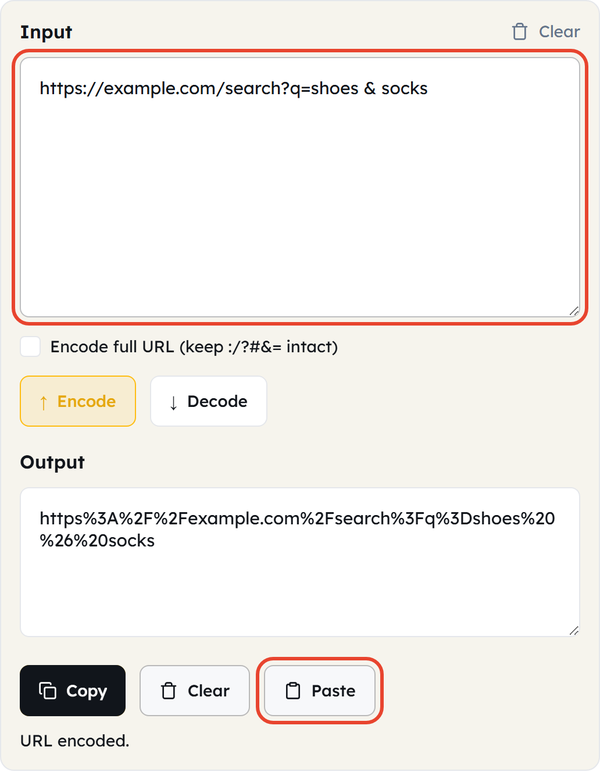
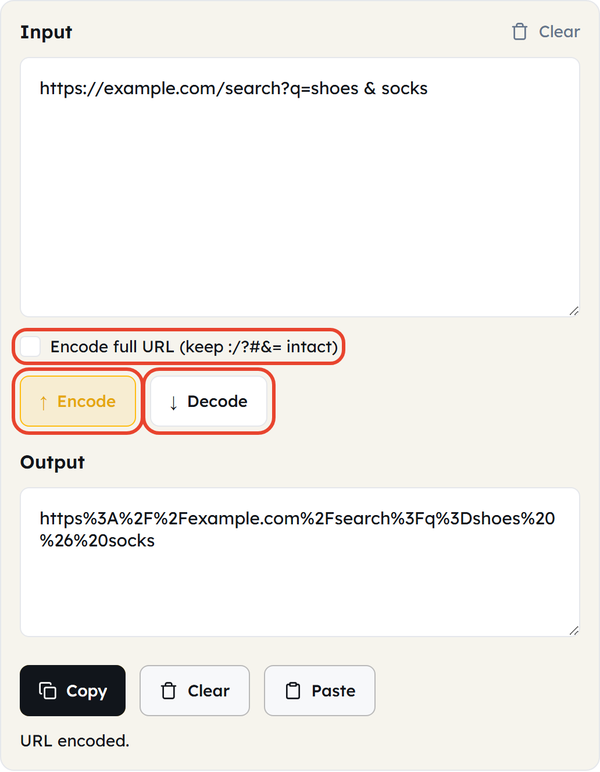
- Press Encode. The tool converts as you type, so Encode and Decode simply set the direction; tick “Encode full URL (keep:/?#&= intact)” first if you are encoding a whole address rather than a single value.
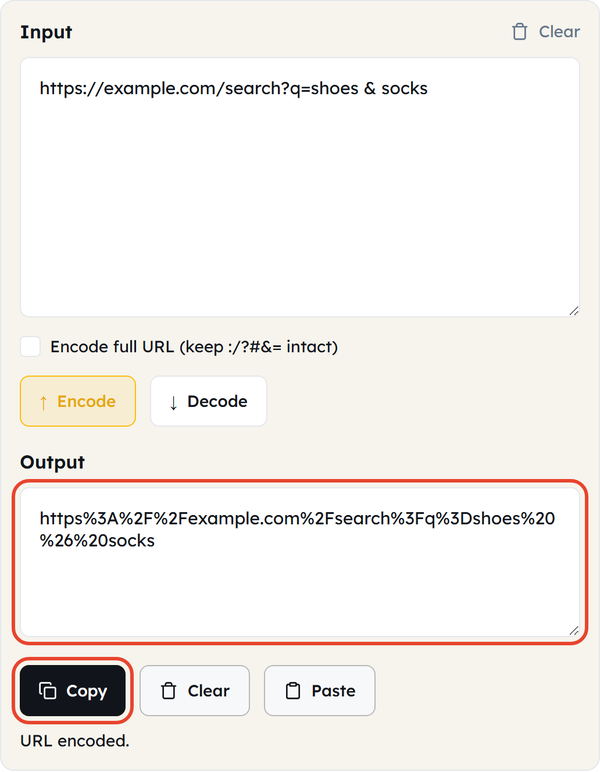
- Press Copy to take the encoded result out of the Output box, or Clear to start again.
- Apply the encoded value to your URL, application or project.
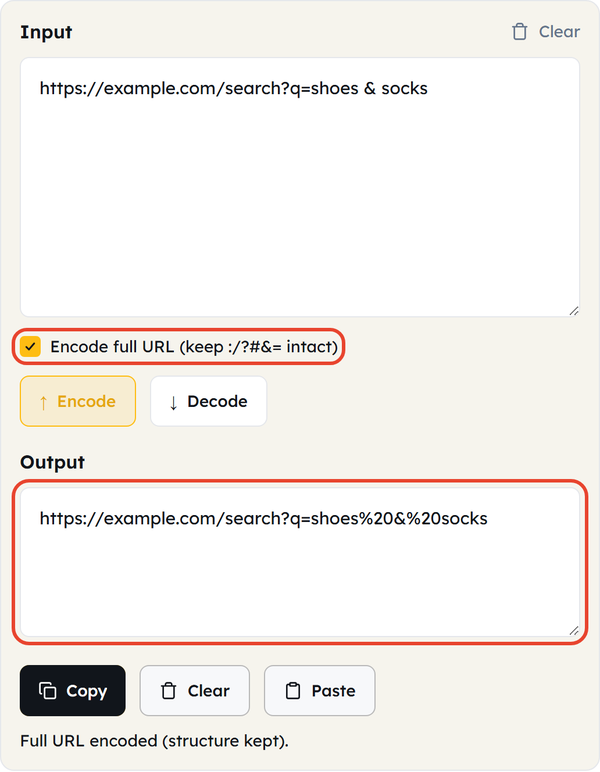
It is useful for developers, SEO specialists, marketers and anyone else who needs to put text into a URL.
Why Is URL Encoding Important?
URLs are structured according to certain rules. Some characters are reserved as they serve to split up different elements of the URL. For instance, ? is used in defining a query string, and & is used to separate query parameters.
When one of those characters appears inside a value you are passing – a search term, a name, a parameter – it is not meant as syntax, but a browser or server will read it as syntax unless it is encoded.
For example, searching for:
shoes & socks
can be encoded as:
shoes%20%26%20socks
That way the ampersand stays part of the value instead of separating two parameters. JavaScript’s encodeURIComponent() does the same job in code, encoding characters such as &, =, / and ?.
Common URL Encodings
There are several characters that are used often and are encoded in this way:
| Character | Encoded Value |
|---|---|
| Space | %20 |
| & | %26 |
| ? | %3F |
| = | %3D |
| / | %2F |
| # | %23 |
| + | %2B |
| : | %3A |
| % | %25 |
Spaces are handled differently depending on context: %20 inside a URL, while form data sent as application/x-www-form-urlencoded writes a space as +. This tool always produces %20.
URL Encoder vs. URL Decoder
A URL Encoder translates normal text into percent encoded formats appropriate for use in a URL.
A URL Decoder does the opposite, decoding the characters back to their original form.
For example:
hello%20world
becomes:
hello world
Use the encoder when you are building a value for a URL and the decoder when you are reading one back. This page does both – the Encode and Decode buttons switch between them.
URL Component Encoding vs. Encoding an Entire URL
Be aware of the difference between encoding a single URL element and encoding a URL.
For instance, when a user’s search term is added to a query parameter, encode the search term as a component. JavaScript’s encodeURIComponent() exists for exactly this.
Encoding a whole URL blindly breaks it, because the /, ? and & that give it its structure get percent-encoded too. Encode only the part that needs it – or tick Encode full URL, which percent-encodes the unsafe characters and leaves:/?#&= intact.
Who Can Use a URL Encoder?
A URL Encoder can be helpful for:
- Web developers who work with URLs, APIs and query parameters.
- SEO specialists who build and test URL parameters.
- Digital marketers who use tracking links and campaign URLs
- QA testers checking web applications and form inputs.
- For students and beginners who are learning URL and web encoding.
- API users to prepare values for use in requests.
Benefits of Using an Online URL Encoder
There are a number of benefits to using an online URL Encoder; these benefits include:
- Fast and easy – convert text to URL-encoded format without replacing the special characters by hand.
- No manual conversion – you never have to recall the hexadecimal value for each reserved character.
- Useful for development – encoded values are what query parameters, APIs and web forms expect.
- Handles special characters – spaces, ampersands, question marks, plus signs and other reserved characters all convert to their encoded form.
- Convenient for testing – developers and testers can encode sample values quickly when debugging URLs and web apps.
Frequently Asked Questions
What is URL encoding?
What is the purpose of a URL Encoder?
A URL Encoder converts text or a URL component into a form that is safe to place in a URL, so reserved characters are read as data rather than as URL syntax.
What is %20 in a URL?
%20 is the percent-encoded form of a space. In form data sent as application/x-www-form-urlencoded a space is sometimes written as + instead.
What’s the difference between URL encoding and URL decoding?
URL encoding turns characters into percent-encoded values; URL decoding turns those percent-encoded values back into the original characters. This page does both.
Do I need to encode the whole URL?
Usually not. It is safer to encode the single component or parameter value, which is what JavaScript’s encodeURIComponent() is for. If you do need to encode a whole address, tick Encode full URL so the:/?#&= characters that give the URL its structure are left intact.
Are URL encoding and percent-encoding the same thing?
Yes. Percent-encoding is also called URL encoding, because it encodes characters as a % followed by hexadecimal digits.
Related Tools
Base64 Encoder
Encode or decode Base64 strings safely.
- 100% Free
- Customizable
- Download
- Unlimited

Hash Generator
Generate MD5, SHA-1, SHA-256, and more hashes.
- 100% Free
- Customizable
- Download
- Unlimited
HTML Encoder
Convert HTML entities to text and back.
- 100% Free
- Customizable
- Download
- Unlimited
JSON CSV Converter
Convert JSON arrays to CSV and back.
- 100% Free
- Customizable
- Download
- Unlimited
UUID Generator
Create unique UUIDs for apps and databases.
- 100% Free
- Customizable
- Download
- Unlimited
Timestamp Converter
Convert Unix timestamps to dates and back.
- 100% Free
- Customizable
- Download
- Unlimited