
No. Hreflang does not increase your ranking; it merely helps to deliver the correct language or localized version of your website.

Hreflang Generator
Generate hreflang tags for multilingual and multi-regional pages.
What the Hreflang Generator Does
If your website has visitors speaking more than one language or living in more than one region, search engines need to know how to display the right page to each visitor. That is where hreflang tags come in. Doing it by hand is tedious and error-prone – a single language code mismatch or a missing reciprocal link can silently break the entire setup. The Hreflang Generator from Tool Flora removes that friction and builds a clean, valid set of hreflang tags in minutes, as HTML link tags, HTTP headers or an XML sitemap.
How to Use the Hreflang Generator
The tool is simple to use even when you have multiple language versions of a page:
- Choose your output format – HTML link tags, HTTP headers or XML sitemap – depending on how your site is built. Load sample fills the form with a worked example if you want to see the shape of the output first.

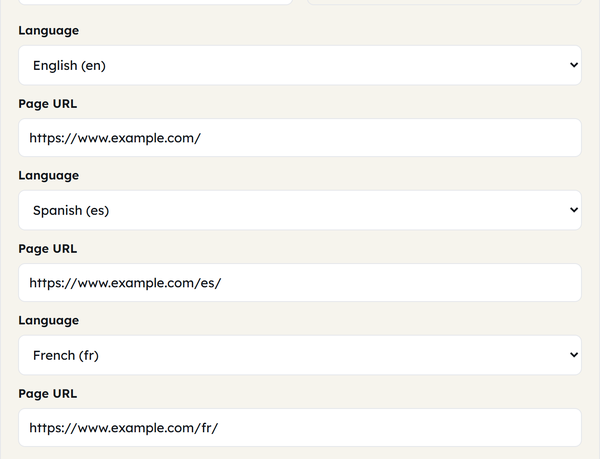
- Add language versions: for each version of the page, pick the language (and region, if you need one) from the drop-down and paste in that page’s URL.
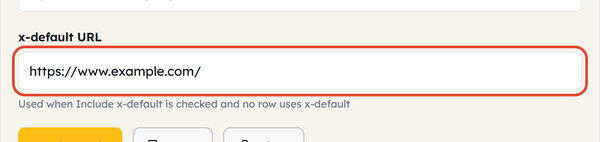
- x-default is already ticked: it sets the fallback page for visitors whose language matches none of your versions. Enter that URL, or untick the box if you do not want a fallback.
- Review the checklist: the four boxes tick themselves as the input becomes valid – at least two language versions, valid URLs, no duplicate languages, and x-default present. The status reads Ready when everything passes.

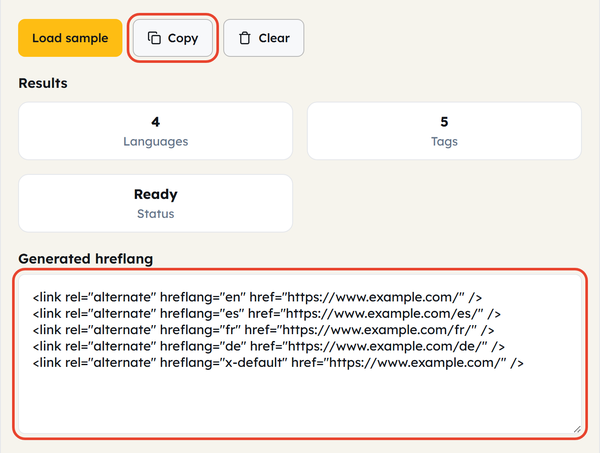
- Copy the generated code: once the status says Ready, use Copy and paste the output into your page head, your server headers or your sitemap file.
What Is Hreflang?
Hreflang is an HTML attribute that tells search engines which language and, optionally, regional version of a page to serve to a particular audience. For example, a company might have separate pages for English speakers in the US and the UK, or for Spanish speakers in Spain vs. Mexico. The hreflang tags connect these together as a reciprocal group, so the search engines understand that they’re just different versions of the same content, not competing duplicate pages.
Each tag carries a language code (such as en or es), sometimes with a region code (such as en-US or es-MX), plus the URL of that version. The tool shows how many languages and how many tags it has produced as you go.
When You Would Use This
Use the Hreflang Generator whenever you are managing a site that has more than one language or regional variation. This includes:
- Publishing a new localized version of an existing page
- Auditing an international site with potential missing/broken hreflang tags
- Moving a multilingual site to a new URL structure
- An XML sitemap-based hreflang implementation instead of inline tags
- Adding a fallback (x-default) page for visitors outside your target languages
Any time search engines need assistance in getting the right page to the right audience, this tool saves you the trouble of writing the tags manually.
Do’s and Don’ts
Do:
- Declare at least two language versions, so the tags can reference each other.
- Make sure all URLs are fully qualified.
- Use x-default if you have a default page.
- Make sure the format used for your hreflang output matches the format used by your website.
Don’t:
- Repeat language codes since duplicates will confuse search engines.
- Fail to modify hreflang tags when deleting or modifying pages.
- Think that hreflang can solve problems with duplicate content on its own; it’s only a signal, not a replacement for canonicals.
- Confuse region codes with language codes – use en-US, not US on its own.
Good to Know
Hreflang tags function optimally when implemented in pairs. This means that each and every page must be referenced from all other pages, including itself. When page A is linked to page B but page B isn’t linked back, there is a high possibility that the annotation will be ignored by the search engine. The check list present in this tool comes handy in catching such errors.
Frequently Asked Questions
Does hreflang affect ranking?
Is it possible to have hreflang without a URL for each language?
No. Hreflang requires a URL for each language version you want to declare.
Is x-default an essential requirement?
No. x-default is optional, but it is worth adding when you want a fallback page for visitors whose language does not match any version you have listed.
What output format is suitable for me?
Choose HTML link tags if you can edit the page head, HTTP headers if you serve non-HTML files such as PDFs, and XML sitemap if you would rather manage hreflang in one file than on every page.