
There is no magic number that will ensure good rankings. The recommended range is 1-2%, but content quality is much more important than achieving a certain number.

Keyword Density Checker
Analyze keyword frequency and density in your content for better SEO balance.
What the Keyword Density Checker Does
As anyone who writes content for the Web knows, search engines take into account the number of times certain keywords appear within a Web page. If there are not enough keyword instances within the page, it might be hard for the search engine to get the gist of what the page is about. Too many instances of your keyword may indicate the old and now ineffective technique of keyword stuffing.
This is where a keyword density checker earns its place. Tool Flora’s Keyword Density Checker analyses your text as you paste it and shows how often each word appears and what share of the page it occupies.
How to Use the Keyword Density Checker
The tool can be used easily and does not require signing up or installing anything:
- Paste your text into the box, or type straight into it – there is a Paste button if you would rather pull it from the clipboard.
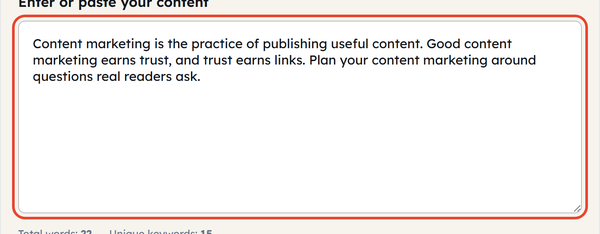
- Insert your focus keyword (optional), if you wish to track its occurrence specifically.

- Ignore case and Ignore common stopwords are both ticked to start with, which keeps filler words such as “the”, “and” and “is” out of the ranking. Untick either one if you want the raw counts instead.

- Read the results: Total words, Unique keywords, Focus count and Focus density, with every term listed underneath and ranked from most to least frequent.
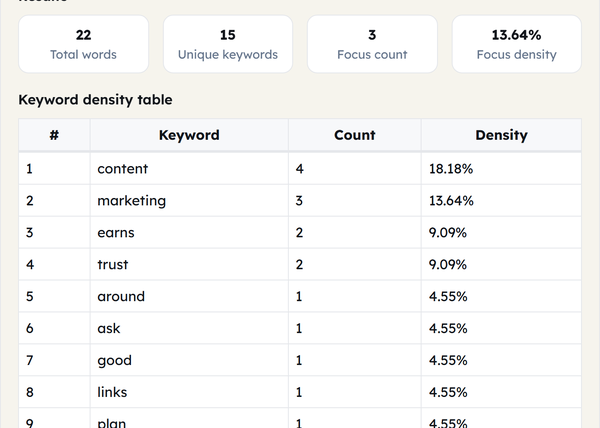
- Use Copy CSV to keep the ranked table, or Clear to empty the box and start on the next piece of text.

What Is Keyword Density?
Keyword density is defined by how many times a particular word or a group of words is repeated in a document compared to its total number of words. The calculation can be done using a very simple formula:
Keyword Density = (Number of times a keyword repeats ÷ Total number of words) × 100
For instance, if an article that contains 1,000 words includes the phrase “content marketing” 10 times, then the keyword density will be 1%. No exact figure is required by the search engines, but experts recommend maintaining it at about 1% to 2%.
When You Would Use This Tool
Keyword density tools are useful in various real-world content situations:
- Prior to posting a blog article or landing page, to check that your target keyword has been used appropriately and not too many times.
- While performing a content audit, to find out pages which might have been over or under optimized with the passage of time as per SEO standards.
- For analyzing the top ranking content of competitors, to learn how frequently certain keywords are used in their pages.
- While editing guest posts or any other freelance content, to avoid accidental stuffing of keywords.
- For optimizing product or category descriptions on an ecommerce website.
Do’s and Don’ts
Do:
- Treat keyword density as a guide, not a target you have to hit.
- Focus on the readability of a sentence rather than cramming keywords into it artificially.
- Calculate the density for different forms and synonyms of your main keyword, not for the exact phrase.
- Use this metric together with other on-page SEO metrics like meta tags and headers.
Don’t:
- Chase an exact density percentage – search engines do not publish one and do not score pages against one.
- Try to repeat a keyword artificially just to increase its number.
- Exclude stopwords completely from your calculations, as they still can show content readability problems.
Frequently Asked Questions
What is the optimal keyword density percentage?
Will too many keywords harm my SEO?
Yes. Repeating a keyword far beyond what reads naturally is keyword stuffing, and search engines may treat the page as low quality or penalise it.
Does this tool save my content?
No. The tool runs entirely in your web browser, so your text is never uploaded, stored or used anywhere.
How many keywords should I measure?
More than one. Checking related terms and synonyms alongside your main phrase gives a far better picture of what the page is about than a single phrase does.
Is this tool free?
Yes. It is free and needs no sign-up – open the page and paste your text in.