
Yes. The Robots.txt Generator is free to use and does not require an account.

Robots.txt Generator
Create a robots.txt file to control how search engines crawl your site.
What the Robots.txt Generator Does
Every site has a quiet gatekeeper: the robots.txt file. It sits in your root folder and tells search engines which parts of the site they may crawl. Get it wrong and you can hide pages you wanted found, or leave private areas open to crawlers. Writing one by hand means learning a set of strict rules where a single misplaced slash changes the meaning. Tool Flora’s Robots.txt Generator writes the file for you in a few clicks instead.
How to Use the Robots.txt Generator
It’s refreshingly easy to use the tool, even if you’re not a programmer:
- Pick a starting point from the preset list: Custom rules, Allow all, Disallow all or WordPress starter. The output box already holds a working file that lets every crawler in.

- Tick any of the common paths you want blocked – /admin/, /cgi-bin/, /tmp/, /private/, /wp-admin/ or /includes/ – and they drop straight into the Disallow list.

- Set the user-agent. It starts at *, meaning every crawler; enter a specific bot such as Googlebot, Bingbot or GPTBot to write rules that apply only to it.

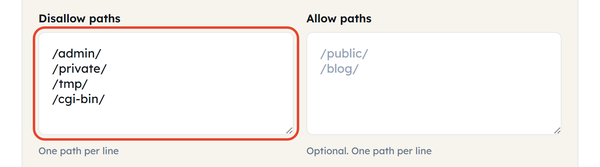
- Enter your Disallow rules for any folders or files that you do not want to appear in the search results, for example, admin areas, staging sites, or any duplicate content.
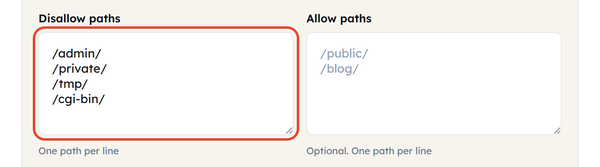
- Enter your Allow rules for any subdirectories that should be accessed even if the parent directory is blocked.
- Set the delay between requests if your server requires crawler slow down.

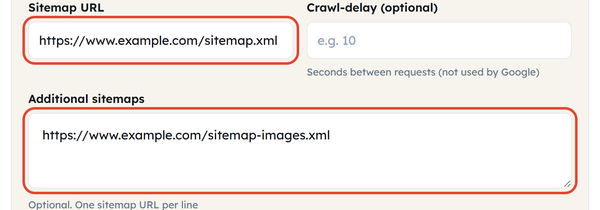
- Paste in your sitemap URL so crawlers find your important pages faster. There is a second box for extra sitemaps if you publish more than one.
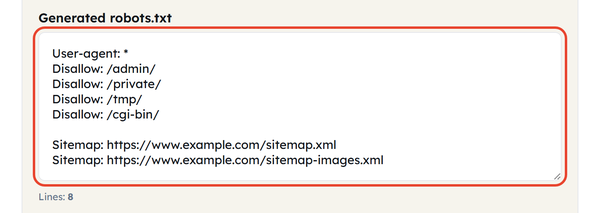
- The file updates as you go – there is no Generate button. Once the status reads Ready, use Copy and save the text as robots.txt in your site’s root directory.
What Is Robots.txt?
A robots.txt file is a very simple text document that is a part of Robots Exclusion Protocol. It is situated in the root directory of your domain (for example, yoursite.com/robots.txt). The document includes some instructions like User-agent, Disallow, Allow, Crawl-delay, and Sitemap used to interact with the web crawling robots before they start examining your pages. To put it simply, think of robots.txt as house rules: it may not actually prevent anything from happening, however, respectable bots like Googlebot or Bingbot read it carefully before making decisions about crawling.
When You Would Use This
The utility of a robots.txt generator is particularly evident in various common situations:
- When starting a new website and needing a properly working robots.txt.
- When wanting to hide pages such as administration, login, or checkout pages.
- When having the issue of duplicate content such as filtered product URLs or tag pages.
- When trying to prevent your staging and development site from being indexed.
- When trying to control AI crawlers such as GPTBot and ClaudeBot.
- When trying to tell crawlers about the sitemap to facilitate their work.
Do’s and Don’ts
Do:
- Ensure that the file is hosted at the correct root URL (yoursite.com/robots.txt).
- Make sure that the commands are in lower case and that the names of directories are followed precisely, because robots.txt is sensitive to the text case.
- Remember to include the link of your sitemap to make indexing faster.
- Check the file after uploading it to make sure it works properly.
Don’t:
- Block your homepage or key landing pages by mistake.
- Rely on robots.txt to hide sensitive data – the file is public, and it is guidance rather than security. Use authentication or a noindex tag for that.
- List every file by name – disallowing a directory already covers everything inside it.
- Assume every bot obeys robots.txt – plenty ignore it entirely.
Good to Know
Robots.txt regulates website crawling only and not indexing. Any page may be indexed even though it is enforced as disallowed through the use of links from other websites. Therefore, if the aim is to make a page completely invisible in search engines, it is better to use robots.txt in combination with a noindex meta tag or to remove all links to this page from the Internet. One should also keep in mind that robots.txt is not updated instantly, since search engines check robots.txt from time to time.
Frequently Asked Questions
Can I use the Robots.txt Generator for free?
Will the existing robots.txt file get overwritten?
No. The tool only writes the text for you to copy. Replacing the live file on your server is entirely your decision.
Can the tool block some bots while allowing others to crawl your site?
Yes. Rules are written per user-agent, so you can block an AI crawler such as GPTBot while leaving Googlebot free to crawl the site.
Do I need a sitemap to use this tool?
No. A sitemap is optional, but adding one helps crawlers discover your content faster, and the tool accepts more than one.
Will robots.txt keep my private pages away from bots?
No. Robots.txt only guides well-behaved bots; it does not block anything. To protect sensitive material use a password or a noindex tag instead.