
It writes valid JSON-LD for you, so you can add structured data to a page without hand-coding it or copying markup out of an old project.

Schema Generator
Generate JSON-LD structured data for common schema.org types.
What the Schema Generator Does
Schema markup helps search engines understand what a page is actually about. Adding it is worth doing, but writing it by hand is fiddly and slow. Tool Flora’s Schema Generator builds JSON-LD structured data in a couple of minutes – Article, FAQ, Person, Organization, Breadcrumb, Local Business, Product or WebSite – without you touching the syntax.
How to Use the Schema Generator
- Select the schema type from the dropdown. It opens on Article, and the fields below change to match whichever type you pick.

- Fill in the fields for that type. For an Article schema that means the headline, author, article URL, description, image URL and the published and modified dates. Load sample fills them with a worked example if you want to see the shape first.
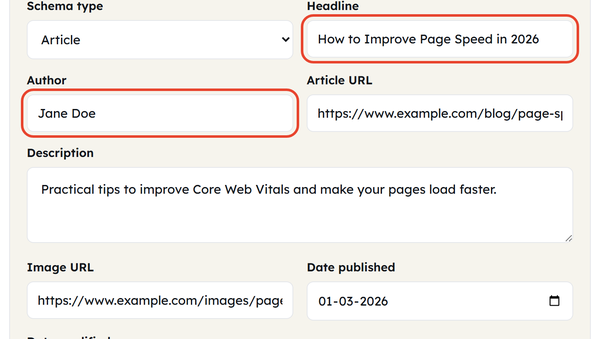
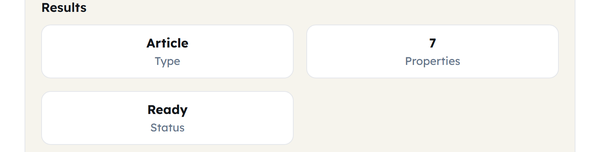
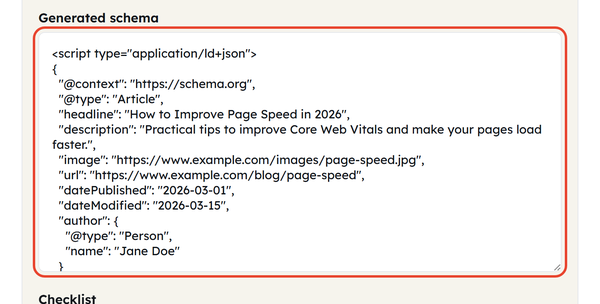
- Watch the JSON-LD build itself in the output box as you type – there is no button to press. The readouts show the type, how many properties it found, and a status that reads Ready once the required fields are in.
- Copy the code, validate it, and paste it into your page. It already comes wrapped in a script type=”application/ld+json” tag, so it is ready to drop in as it is.
What Is a Schema Generator?
A schema generator creates structured data for your site without manual coding. The output is JSON-LD, the format search engines prefer, and it tells them extra detail about the page that the visible content alone does not make obvious. Tool Flora’s generator asks for a few plain fields and writes the markup for you. The types it covers are:
- Article
- Organization
- Breadcrumb
- Local Business
- WebSite
- Person
- FAQ
- Product
When You Would Use This
Use the Schema Generator whenever you want structured data on a page but have no coding experience. It is especially useful for beginners making a site search-engine friendly. Reach for it when:
- You post a new article.
- You have added an FAQ section to a page.
- You have added product information.
- You have author pages on your website.
- You are creating breadcrumb markup.
- You are optimising a local business website.
- You are adding organisation details to your website.
- You are improving technical SEO.
Do’s and Don’ts
Here are some do’s and don’ts for using the Schema Generator.
Do:
- Always use the exact information that appears on your website.
- Select the correct schema type for the content.
- Validate your schema before implementing it.
- Keep names, dates, URLs and descriptions accurate and up to date.
- Keep the schema consistent across your website.
Don’t:
- Don’t add irrelevant schema types on any webpage.
- Never provide misleading, wrong, or outdated information for schema tags.
- Never use conflicting schemas on a page.
- Don’t consider schema markups alone to guarantee rich search results.
- Never ignore validation errors or warnings.
Good to Know
Remember that schemas are always considered an important part of SEO, but only if they are generated and implemented correctly. Schema markup helps search engines like Google to understand your website and its intent easily, but at the same time, it does not guarantee higher ranking or rich search results. It is as important as other on-page, off-page, and technical SEO factors. Always keep in mind that you should implement relevant schemas on your web pages and always validate the code before publishing it on your website and keep the markup up to date with the latest changes on your website. Avoid using markup with outdated or misleading information. Using relevant and accurate schemas definitely helps you in ranking higher on Google.
Frequently Asked Questions
Why should I use the Schema Generator tool?
What type of schema can I generate with the tool?
Eight types are built in: Article, FAQ Page, Product, Organization, Local Business, Person, Breadcrumb List and WebSite.
Do I need coding knowledge to use a schema generator?
No. Fill in the fields for the type you picked and the tool writes the code, ready to paste into your page.
Should I validate the generated schema?
Yes. Always validate before publishing – it catches errors and confirms the markup is formatted the way search engines expect.