
No. UTM parameters are for analytics, not ranking. Just make sure the page has a canonical tag pointing at the clean URL, so the tagged versions are not treated as separate duplicate pages.
UTM Link Builder
Build campaign URLs with UTM parameters for accurate traffic tracking.
What the UTM Link Builder Does
Have you ever analyzed your traffic on your analytics dashboard and asked yourself how the visitor arrived there? The visitor who appears as direct traffic may be someone who clicks on the link from email, a social media post, a paid advertisement, or a partner’s website. In such a case, without tagging, you would not know how the visitor got there. This is when UTM Link Builder comes in handy. It is a tool that enables you to tag your URL so that you can use it in the analytics platform to understand the exact campaign, source, and medium through which each visitor has visited your website.
How to Use the UTM Link Builder
Utilizing the tool will not be difficult even if you have no experience creating a tagged URL:
- Enter your website URL – the full destination link including https://. If it already has a query string, the tool joins the tags on correctly with an ampersand.

- Campaign Source — Indicate the source of traffic, for example, google, newsletter, or facebook.
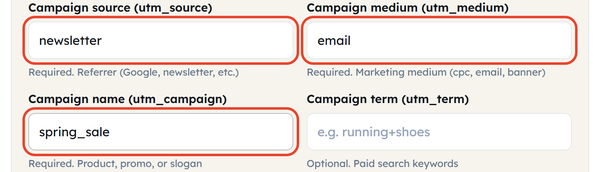
- Campaign Medium — State how the traffic will come, for instance, cpc, email, social, or banner.
- Campaign Name — Provide a name for the campaign; it can be the name of a product launch or a slogan of some season promotion.
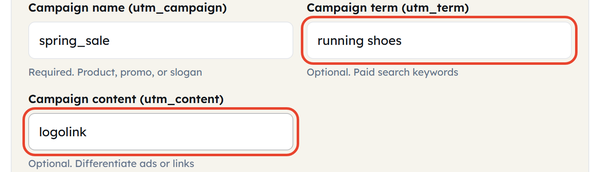
- Term and Content are optional: utm_term for paid search keywords, utm_content to tell apart two links pointing at the same page. Spaces are encoded as + automatically.
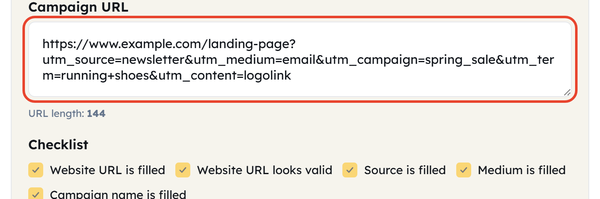
- Copy the final URL – the tagged link builds itself as you type, and the checklist ticks off URL filled, URL valid, source, medium and campaign as each one is done.
What Is a UTM Parameter?
“UTM” is an acronym for “Urchin Tracking Module.” This name was derived from the Urchin web analytics suite that Google had bought a while back. UTM parameters are tiny codes included at the end of a URL which help analytics tools determine where the click came from. The five main UTMs are utm_source, the referrer; utm_medium, the media type; utm_campaign, the particular campaign; utm_term, keywords used in paid searches; and utm_content, used for A/B testing. Once someone clicks on the URL with this code, the UTMs will be collected along with their session data, helping to segregate traffic by campaign and not just by general classification.
When You Would Use This
UTM tagging comes in handy whenever the origin of your traffic is not recognized by analytical software. Some examples include:
- You send an email campaign and want to know how many clicks it actually produced
- You run paid ads on Google, Meta or LinkedIn and want to compare their performance
- You share links in a newsletter, a podcast description or on a partner’s site
- You are testing different ads and need to see which creative wins
- You put a QR code on printed material, where there is no referrer to fall back on
In essence, UTM tagging eliminates any doubt about the source of your traffic.
Do’s and Don’ts
Do:
- Consistently apply naming convention rules (all lowercase and no spaces) to ensure reports won’t split identical campaigns into different rows
- Create guidelines for your tagging system to ensure everyone on your team applies it consistently
- Apply utm_content for comparing multiple links that lead to the same page
Don’t:
- Use tags on your own website links because this could lead to wiping out session data and breaking attribution
- Use any special characters or spaces in parameter values; hyphens or underscores would be more appropriate
- Make your campaign name complicated by including dates and other codes that will make it difficult to read in reports
Good to Know
UTM parameters won’t affect what your visitors see on your web page since they are intended for tracking only and aren’t displayed anywhere on the rendered page, except for the address bar. Moreover, sometimes tagged links can look pretty long and less appealing, especially when used in posts on social media, which is why many marketers use URL shorteners in such cases.
Frequently Asked Questions
Does UTM tagging influence SEO?
Can I use UTM tags on internal links?
It is not advised. Tagging a link between two pages of your own site restarts the session and overwrites the original source, so the visit gets credited to the wrong channel.
Is this service free of charge?
Yes. The UTM Link Builder is free to use and needs no registration.
What happens if I leave the optional fields empty?
The URL still works. utm_term and utm_content only add detail – keywords for paid search, or a label that tells two links to the same page apart.
What if my link already has a question mark in it?
That is handled for you. If the destination URL already carries a query string, the tool joins the UTM tags on with an ampersand instead of a second question mark, so the link stays valid.