
A case converter changes the capitalization of the text you give it to the format you select — uppercase, lowercase, title case, sentence case, and others — without rewriting the words themselves.
Case Converter
Convert text between different letter cases instantly.
Changing the capitalization of text by hand takes a long time, but with Tool Flora’s case converter it happens the moment you click, however much content you are working with.
Paste or type into the text area, choose the case format you need, and use the converted version wherever you are working. It helps with writing, coding, editing, content creation, and more. Whether you need UPPERCASE, lowercase, Title Case, Sentence case, Toggle Case, or Capitalize Words, this tool makes repetitive formatting far quicker.
How to Use the Case Converter
It is an easy tool to use. Here is the whole process.
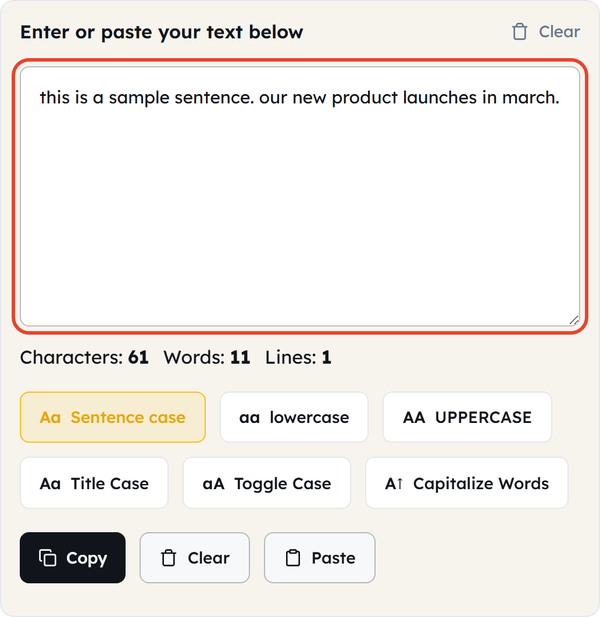
- Enter your text — type into the text area or paste text you have already written, from a short sentence to a long document. You can also click Paste to drop in whatever is on your clipboard. Characters, Words, and Lines counts appear underneath as you type.
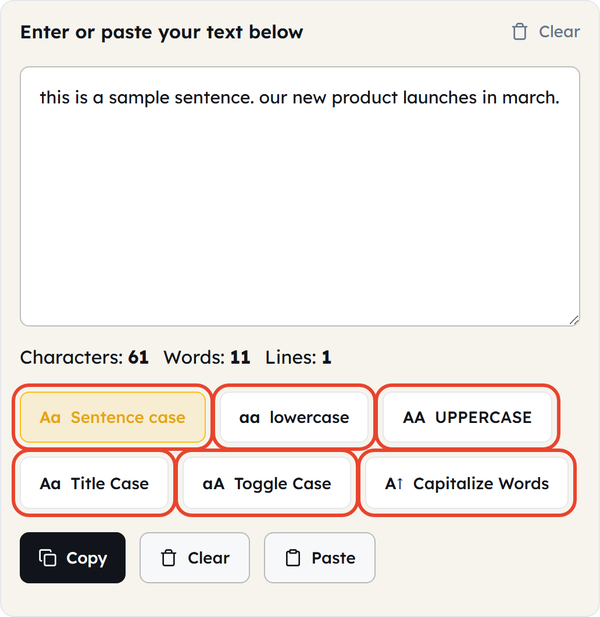
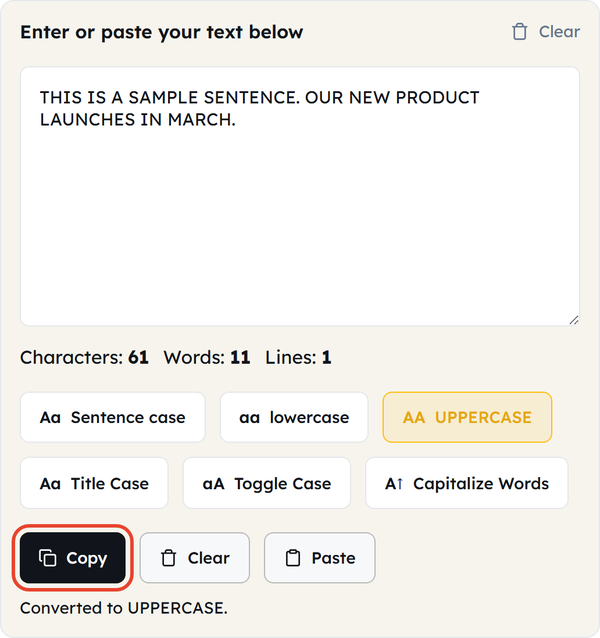
- Choose the case you need — click one of the six buttons: Sentence case, lowercase, UPPERCASE, Title Case, Toggle Case, or Capitalize Words. There is no separate convert step; the text changes as soon as you click.
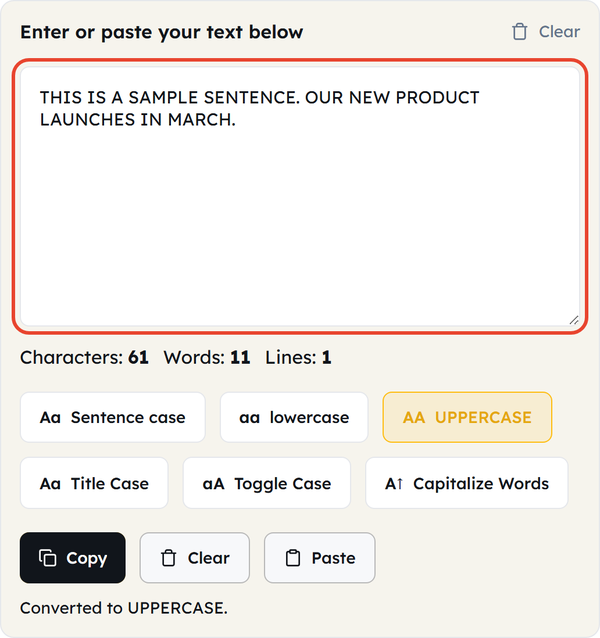
- Review the converted text — the result replaces the text in the same box, so read it through and check that the capitalization looks the way you want.
- Copy the result — click Copy and paste the text wherever you need it: a website, a document, an email, a social media post, a code editor, or anywhere else.
- Convert again if needed — click another case button to restyle the text. Note that each conversion works on what is already in the box, not on your original wording, so paste the source text again if you want to start from it. Clear empties the box when you are ready for a new piece.
What Is Case Conversion?
Case conversion means changing the capitalization of the letters in a piece of text without changing the words themselves. For example:
Original: This is a sample sentence.
UPPERCASE: THIS IS A SAMPLE SENTENCE.
lowercase: this is a sample sentence.
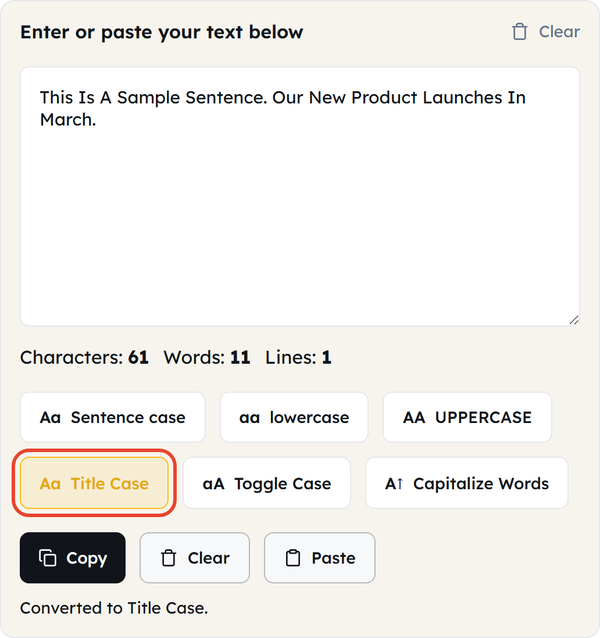
Title Case: This Is A Sample Sentence.
A case converter automates these changes so you don’t have to edit every letter by hand.
When Would You Use This?
- Formatting Headings — give headings, titles, or section names a consistent capitalization style.
- Editing Documents — when a document has inconsistent capitalization, a case converter reformats the selected text quickly.
- Content Writing — writers can use it for articles, websites, descriptions, captions, and other written material.
- Social Media — convert text into a specific capitalization style before using it in a post, caption, or profile.
- Product Information — keep capitalization consistent across product names, labels, descriptions, and lists.
- Cleaning Copied Text — text copied from different sources often has inconsistent capitalization, and a case converter standardizes it.
- Coding and Development — useful for variable names, labels, and sample data. Always check the naming convention your project requires before converting.
- Lists and Spreadsheets — standardize a list whose capitalization has drifted.
- Quick Text Formatting — change the case of a block of text in a click instead of retyping it.
Do’s and Don’ts
Do’s
- Check your original text before converting it.
- Choose the case format based on the platform you are writing for.
- Review the converted text before publishing or submitting it.
- Keep a copy of important text before converting, because the result replaces it.
- Use consistent capitalization across headings, lists, and similar content.
- Check brand names, proper nouns, and technical terms in the converted text.
Don’ts
- Don’t assume automatic conversion understands the intended meaning of every word.
- Don’t publish converted text without reviewing it.
- Don’t rely on Title Case for style-sensitive titles without checking your preferred capitalization rules.
- Don’t convert code blindly, especially where capitalization affects variable names, functions, classes, or other identifiers.
- Don’t change the capitalization of brand names or proper nouns without checking the correct spelling.
- Don’t confuse changing letter case with rewriting or proofreading the text.
Good to Know
- Case conversion changes capitalization; it does not rewrite the meaning of your text.
- Six formats are available: Sentence case, lowercase, UPPERCASE, Title Case, Toggle Case, and Capitalize Words.
- Characters, Words, and Lines are counted live as you type, before and after converting.
- There is no separate output box — the converted text replaces what you typed, so keep a copy of anything important.
- Sentence case lowercases abbreviations such as NASA and USA, so those need a manual correction afterwards.
- Different writing styles use different capitalization rules.
- Proper nouns and brand names may need manual correction after conversion.
- Converting text does not correct spelling, grammar, punctuation, or factual errors.
- Some technical terms have a specific capitalization that should be preserved.
- When you are working with code, capitalization can change how the code behaves.
- Everything happens in your browser — your text is not uploaded anywhere.
Common Text Cases Explained
Understanding the six formats helps you choose the right one.
Uppercase
Example: THIS IS UPPERCASE TEXT.
Every applicable letter is capitalized.
Lowercase
Example: this is lowercase text.
Every letter is converted to lowercase.
Title Case
Example: This Is Title Case Text.
The first letter of every word is capitalized, short words included.
Sentence Case
Example: This is sentence case text.
The first letter of a sentence is capitalized and the rest is lowercased, unless a proper noun or another rule calls for a capital.
Toggle Case
Example: tHIS iS tOGGLE cASE tEXT.
Each letter is flipped to the opposite case, so capitals become small letters and small letters become capitals.
Capitalize Words
Example: This Is Capitalized Text.
A capital is placed at the start of every word while the remaining letters are left as they are.
The exact result depends on the text you give it, so reviewing the final version is always worthwhile.
Why Use a Case Converter?
Changing capitalization looks like a small job until you are working through long paragraphs, lists, or several pieces of content. This tool restyles the whole block in a click instead of making you hunt for individual letters.
That is particularly helpful when you are making text consistent across all of your content at once.
Case Conversion vs. Text Formatting
Case conversion is only one part of text formatting. It affects the letters themselves, but it does not change font size, font style, spacing, alignment, colours, or any other formatting.
For example: welcome to our website — WELCOME TO OUR WEBSITE
That changes the capitalization, but it does not make the text bold, larger, or centred. Use a case converter for capitalization and a full text editor for everything else.
Frequently Asked Questions
What is a case converter?
How do I use a case converter?
Type or paste your text into the text area, click one of the six case buttons, and the text is rewritten in that style straight away. Then click Copy to take the result with you.
Can I convert a whole paragraph?
Yes. You can paste a paragraph or a much larger piece of text and convert its capitalization in one click instead of editing it line by line.
Can I convert text into uppercase?
Yes. The UPPERCASE button changes every applicable letter to a capital letter.
Can I convert text into lowercase?
Yes. The lowercase button changes every applicable letter to a small letter.
What is Title Case?
Title Case is a capitalization style used for titles and headings. In this tool it capitalizes the first letter of every word.
What is Sentence case?
Sentence case capitalizes the first letter of each sentence and leaves the rest lowercase unless a letter needs capitalizing for another reason, such as a proper noun.
What do Toggle Case and Capitalize Words do?
Toggle Case flips each letter to the opposite case, so capitals become small letters and small letters become capitals. Capitalize Words puts a capital at the start of every word and leaves the remaining letters as they are.
Does a case converter fix grammar?
No. A case converter changes capitalization only; it does not check your grammar, spelling, punctuation, or sentence structure.
Does it affect the meaning of the text?
Usually not, but capitalization can carry meaning in names, abbreviations, and programming code, so always review the converted text.
Can I use it for my headings?
Absolutely. It is useful for giving headings and titles a consistent capitalization style.
Can I use it for my social media?
Of course. You can use the converted text in social media posts, captions, descriptions, or any other content.
Can developers use case converters?
Yes, for text-based tasks. Be careful with code, though: capitalization affects variable names, function names, class names, and other identifiers.
Will it preserve my original text?
No. The converted text replaces what is in the box, so save anything important separately before you convert it.
Should I check the converted text?
Yes. Always check brand names, proper nouns, abbreviations, and technical terms, as automatic conversion applies the same rule to every word.
Is this tool free to use?
Yes. Tool Flora provides the Case Converter as a free online text utility you can use directly in your browser.
Do I need to install anything?
No. The tool works through your web browser without any separate application, and your text is converted on your own machine rather than uploaded to a server.
Related Tools
Character Counter
Track characters with or without spaces in real time.
- 100% Free
- Customizable
- Download
- Unlimited

Sentence Counter
Count sentences and average length as you type.
- 100% Free
- Customizable
- Download
- Unlimited
Paragraph Counter
Measure paragraphs and structure at a glance.
- 100% Free
- Customizable
- Download
- Unlimited
Remove Extra Spaces
Clean double spaces and tidy whitespace fast.
- 100% Free
- Customizable
- Download
- Unlimited
Remove Line Breaks
Flatten text by stripping unwanted line breaks.
- 100% Free
- Customizable
- Download
- Unlimited
Remove Duplicate Lines
Deduplicate lines while preserving order.
- 100% Free
- Customizable
- Download
- Unlimited