
It counts every non-empty line as one paragraph. Blank lines between blocks are ignored rather than used as the boundary, so text split by single line breaks and text split by blank lines come out the same.
Paragraph Counter
Count paragraphs, characters, words, and lines instantly as you type.
Word count alone doesn’t tell you whether a piece of writing is well-structured, a 1,000-word essay in two paragraphs is quite different from one in ten paragraphs. Using the Paragraph Counter, you can track paragraph structure along with character, word, and line counts, before sending a piece to an editor or publishing it.
Paste your draft in and get all four counts at once, updated live as you edit.
How to Use the Paragraph Counter
- Paste or type your text into the input box. Each non-empty line is counted as a paragraph, so keep your draft laid out the way you intend to publish it.
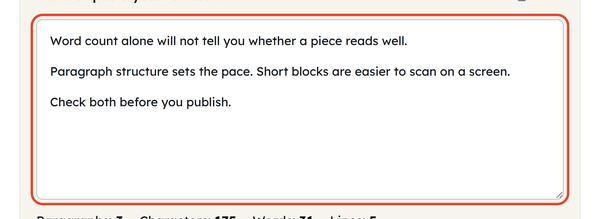
- Check the live counts below: Paragraphs, Characters, Words, and Lines.
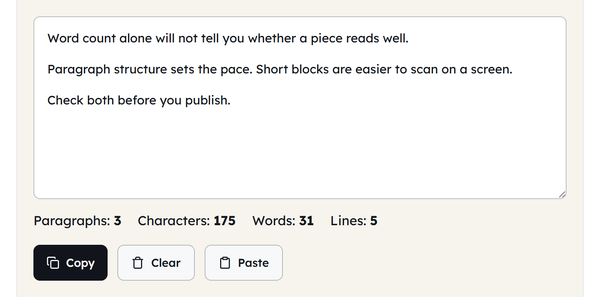
- Click Copy to grab your text, or Paste to paste text from your clipboard.

- Use Clear to reset and check a different draft.

All four counts update together as you type, so you don’t have to check structure versus length.
What Is a Paragraph Count?
A paragraph count is the number of distinct paragraphs in a piece of writing, where a paragraph is a block of text set apart from the next by a blank line. It’s about the way content is organized and paced, and word count and character count aren’t enough to show this on their own — two pieces with the same number of words can read very differently depending on how that text is broken up.
If you are an editor, teacher or publisher, paragraph structure is particularly important because it is easier to read when the text is broken up into chunks.
When Should You Check Your Paragraph Count?
- Reviewing an essay, article or report before submitting it.
- Ensuring that a piece of writing fulfills a paragraph-count requirement set by an assignment or brief
- Reviewing blog drafts to make sure of pacing, as shorter paragraphs tend to work better on the internet.
- Auditing pasted content for merged or missing paragraph breaks after copying from another source
- Comparing paragraph length across a draft to spot sections that run too long or too short
- Preparing content for a CMS or platform that requires a specific structure to paragraphs.
Paragraph Counter Do’s and Don’ts
| Do | Don’t |
|---|---|
| Separate paragraphs with a full blank line before pasting. | Assume every visual gap is a true paragraph break. |
| Use alongside word count to determine average paragraph length. | Don’t judge quality based on length, sometimes it isn’t clear enough. |
| Recount after editing, as spacing tweaks change the totals. | Copy from PDFs without adding or removing extra line breaks. |
Good to Know – Paragraph Breaks and Counts
- This tool treats every non-empty line as one paragraph, so a blank line between blocks changes nothing – two pieces laid out differently but with the same number of text lines report the same count.
- Dividing your word count by your paragraph count gives a quick average paragraph length, useful for spotting whether a draft is unusually dense.
- Shorter paragraphs tend to perform better for on-screen reading — most web style guides recommend 2-4 sentences per paragraph for body content.
- A single well-developed paragraph and a rambling one can have the same paragraph count, so this tool measures structure, not writing quality.
Why Paragraph Structure Matters for Readability and SEO
Paragraph length is not only a matter of style – it affects how long people stay on a page.
- Search engines tend to favor scannable content, and shorter paragraphs with clear breaks make it easier for both readers and crawlers to identify distinct ideas on a page.
- Most web reading happens in an F-shaped or Z-shaped scanning pattern rather than a full top-to-bottom read, so dense blocks of text are more likely to get skipped entirely.
- On mobile screens, a paragraph that looks reasonable on a desktop can stretch into an intimidating wall of text — checking paragraph count as well as word count before publishing helps prevent that.
- Featured snippets and AI-generated summarised search results are likely to be short snippets of text, which address one question at a time, rather than longer, multi-idea snippets.
Ideal Paragraph Length for Different Types of Writing
There’s no single rule for paragraph length, but a few common patterns are:
| Writing Type | Typical Paragraph Length |
|---|---|
| Academic essay | 100-200 words per paragraph, one clear idea each |
| Blog post | 40-80 words, often just 2-4 sentences for easy scanning |
| News article | Short sentences (1-3 per paragraph) for quick reading. |
| Business report | 80–150 words, structured around one point or finding |
| 2–4 sentences with frequent breaks in them to prevent overcrowding. |
Frequently Asked Questions
How does the tool decide where a paragraph ends?
Why is my count too high after pasting from a PDF or website?
PDFs and some web pages end every visual line with a line break, so one flowing paragraph can arrive as eight separate lines and be counted as eight. Join those lines back together and the total settles down.
Is there an ideal number of paragraphs for an essay or article?
There is no fixed number – it depends on the length and purpose of the piece. A 500-word blog post might need four or five, while a 2,000-word report will need considerably more.
Does a single-sentence paragraph count?
Yes. Any non-empty line counts as one paragraph, however short it is.
Is my text saved or stored anywhere?
No. Counting happens in your browser as you type or paste. Nothing is ever sent to or stored on a server.
Can I check the paragraph count for non-English text?
Yes. The tool works from line breaks rather than any language’s grammar rules, so it behaves the same whatever you are writing in.
Related Tools
Character Counter
Track characters with or without spaces in real time.
- 100% Free
- Customizable
- Download
- Unlimited

Sentence Counter
Count sentences and average length as you type.
- 100% Free
- Customizable
- Download
- Unlimited
Case Converter
Convert text between upper, lower, title, and more.
- 100% Free
- Customizable
- Download
- Unlimited
Remove Extra Spaces
Clean double spaces and tidy whitespace fast.
- 100% Free
- Customizable
- Download
- Unlimited
Remove Line Breaks
Flatten text by stripping unwanted line breaks.
- 100% Free
- Customizable
- Download
- Unlimited
Remove Duplicate Lines
Deduplicate lines while preserving order.
- 100% Free
- Customizable
- Download
- Unlimited