
Only if you tick Remove blank lines. Leave that option off and the tool cleans the spacing inside your paragraphs while keeping the line breaks between them intact.

Remove Extra Spaces
Clean extra spaces, trim lines, and remove blank lines.
Text copied from a PDF, an email, or a formatted document often carries over spacing problems you can’t always see, double spaces between words, trailing whitespace at the end of lines, or stray blank lines. The Remove Extra Spaces tool cleans all of it up in a single click.
Paste in your text, select which kind of cleanup you need, and copy a clean text.
How to Remove Extra Spaces From Text
- Type or Paste your text into the input box.
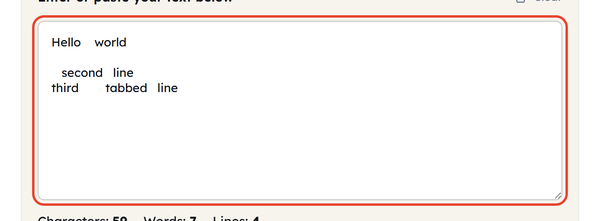
- Collapse multiple spaces and Trim each line are already on. Tick Remove blank lines as well if you want the empty lines gone too.

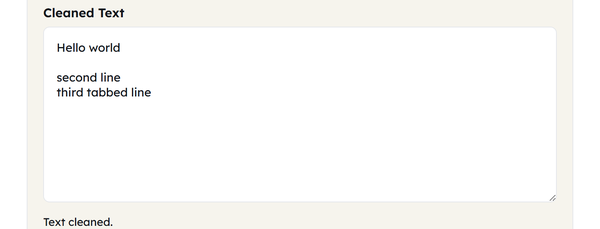
- Click on Clean Text to get the cleaned text.

- Check the Characters, Words, and Lines counts to see what changed.

- Click Copy to grab the cleaned text, or Clear to start over.
What Are Extra Spaces?
Extra spaces are any unwanted and invisible whitespace that creep into text without being visible at a glance — a double space left after a deleted word, a trailing space at the end of a line, or a blank line left behind when content was removed. None of these are usually intentional, but they add up, especially in text that’s been copied, pasted, and edited across different sources.
This tool will solve three different types of whitespace issues, with each having a separate option:
| Option | What It Does |
|---|---|
| Collapse multiple spaces | Turns 2+ spaces between words into a single space. |
| Trim each line | Removes hidden spaces from the very edges of each line. |
| Remove blank lines | Deletes empty lines to pull text blocks together. |
When Should You Remove Extra Spaces From Text?
- Cleaning text copied out of a PDF before pasting it into a page or document
- Tidying up content pulled from an email before reusing it elsewhere
- Cleaning up word formatting when copied from a word document or Google doc.
- Fixing spacing inconsistencies before running a word or character count that needs to be accurate
- Cleaning up data (such as addresses or names), which are pasted in bulk from a spreadsheet and then imported into another system.
- Cleaning up scraped or exported web content before publishing
Extra Space Removal – Do’s and Don’ts
| Do | Don’t |
|---|---|
| Enable all options for messy PDF text. | Use “Remove blank lines” if you need paragraphs. |
| Check the character count to see removed bloat. | Expect this to fix formatting caused by tabs. |
| Clean text before pasting into a CMS or web form. | Use on code, it ruins required indentation. |
Things to Know Before Cleaning Extra Spaces
- Most software will automatically remove visible whitespace from a browser or document viewer and the extra characters will still be there in the underlying text, but will not be visible.
- A browser collapses runs of whitespace when it renders HTML, so extra spaces are invisible on the page – but they remain in the source, still break code, scripts and plain-text exports, and still add to the file size.
- Clean the spacing before you rely on a character or word count. Platforms differ in whether they count runs of whitespace, so an uncleaned block can measure differently in two places.
- Tabs and non-breaking spaces are handled too – both collapse to a single ordinary space when Collapse multiple spaces is on, so pasted text from a spreadsheet or a web page comes out consistent.
Where Do Extra Spaces in Text Come From?
Some sources are much more likely to cause whitespace issues than others:
| Source | Why It Introduces Extra Spaces |
|---|---|
| PDF documents | Text relies on page coordinates, which scrambles normal formatting. |
| Email clients | Long reply chains inherit and stack messy line breaks. |
| Word processors | Extra spaces in the justified text alignment are not visible. |
| Spreadsheets | Cell padding and column widths turn into spaces when copied. |
| Web pages | Blank gaps will also be passed down for hidden HTML styling elements. |
Where Extra Spaces Actually Cause Problems
In addition to being an eyesore, extraneous whitespace creates hard-to-see problems in a couple of specific locations:
- Meta titles and descriptions: a double space between words silently eats into the character budget Google gives your snippet before truncating it with an ellipsis.
- Structured data and code: JSON and other strict formats may result in parsing errors for unexpected whitespace in values, particularly if text is pasted in from a document.
- CSV imports and spreadsheets: If there is a trailing space in a value, such as “USA” vs “USA”, two rows that are supposed to be the same would be considered different categories.
- Email deliverability: some spam filters will look out for unusual spacing patterns which tend to point to copy-pasted or auto-generated content.
Frequently Asked Questions
Will this delete my paragraph breaks?
Is my sensitive data safe?
Yes. All processing happens locally in your browser. Nothing is uploaded, saved or sent to a server.
Does this tool fix messy code indentation?
No, and you should not use it for that. Collapse multiple spaces flattens deliberate indentation, which breaks languages such as Python that depend on it.
Why did my word count drop after cleaning?
Extra spaces and trailing blank lines can inflate a basic counter. Cleaning the text first gives you the true count.
Will this fix odd spacing pasted from Excel or Google Sheets?
Yes. Tabs and non-breaking spaces are both collapsed to a single normal space along with ordinary runs of spaces. Bear in mind that spreadsheets use tabs to separate columns, so pasting a multi-column selection and cleaning it will merge those columns into one line.
Is there a limit to how much text I can clean at once?
No. A single sentence or a full manuscript both work – the tool handles it in your browser as you go.
Related Tools
Character Counter
Track characters with or without spaces in real time.
- 100% Free
- Customizable
- Download
- Unlimited

Sentence Counter
Count sentences and average length as you type.
- 100% Free
- Customizable
- Download
- Unlimited

Paragraph Counter
Measure paragraphs and structure at a glance.
- 100% Free
- Customizable
- Download
- Unlimited
Case Converter
Convert text between upper, lower, title, and more.
- 100% Free
- Customizable
- Download
- Unlimited
Remove Line Breaks
Flatten text by stripping unwanted line breaks.
- 100% Free
- Customizable
- Download
- Unlimited
Remove Duplicate Lines
Deduplicate lines while preserving order.
- 100% Free
- Customizable
- Download
- Unlimited