
A PDF stores a hard return at the end of every visual line, and those returns come across when you copy. This tool strips them so the text wraps naturally again.
Remove Line Breaks
Remove line breaks, empty lines, or replace them with a separator.
Text copied out of a PDF or an email often has a line break at the end of every line rather than at the end of every paragraph, which leaves it broken and choppy once you paste it somewhere else. The Remove Line Breaks tool reflows that text back into clean, continuous paragraphs – or turns it into a separator-delimited list, if that is what you actually need.
Copy and paste your text, choose a mode and get a clean result in seconds.
How to Use the Remove Line Breaks Tool
- Just type or paste your text right into the box.
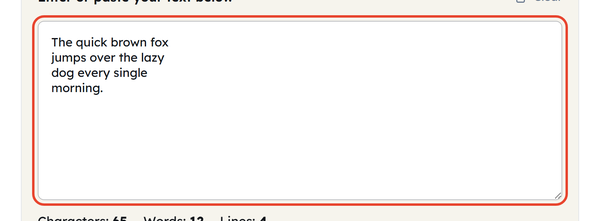
- Pick a mode: Remove all line breaks (join with space), which is selected to start with, Remove only empty lines, or Replace breaks with a separator.
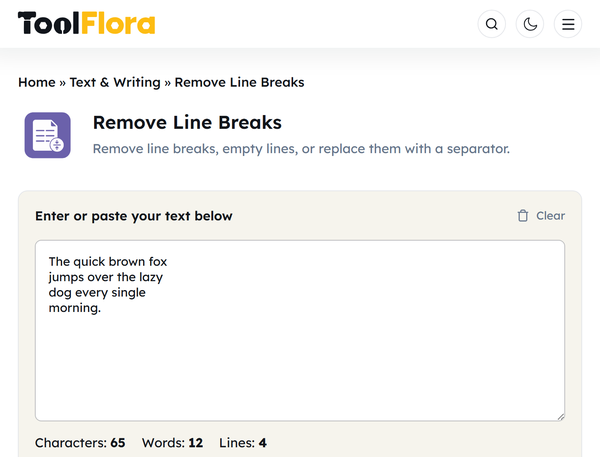
- If you chose the separator option, set the Separator field – it starts as a comma and a space. Clear any blank lines out of your text first, or each one becomes an empty item in the result.

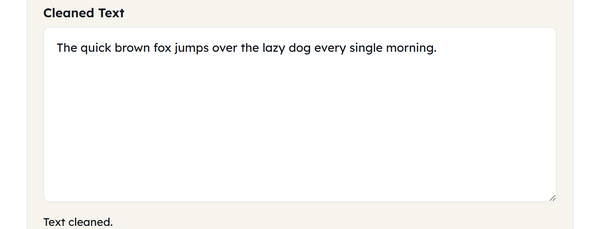
- Click Clean Text to get the result.

- Click Copy to grab it, or Clear to start over.
What Does Removing Line Breaks Mean?
A line break is the invisible character created every time you press Enter or Return, marking where one line ends and the next begins. The removal of line breaks removes the line breaks so the text flows together instead of staying broken across separate lines.
It is most important for text that has been formatted into a fixed width elsewhere, such as a PDF, a printed page, an old email, etc., where any sentence or paragraph may end at any point in the line irrespective of where the line itself is wrapped. After that has been pasted into a place with different formatting, those old line breaks appear as strange and unwanted line breaks in the middle of the sentences.
This tool provides you three options to handle that:
| Mode | What It Does |
|---|---|
| Remove all line breaks (join with space) | Combines all the lines into one line, replacing breaks with spaces. |
| Remove only empty lines | Deletes blank spacer lines but keeps single line breaks intact. |
| Replace breaks with a separator | Changes line breaks for another specified character (such as a comma or pipe). |
When Should You Remove Line Breaks?
- Fixing text copied from a PDF that broke every line at the page margin instead of at paragraph ends
- Cleaning up an email reply that carried over odd line breaks from a mobile client
- Converting a line-by-line list into a comma-separated or pipe-separated string for a spreadsheet or script
- Formatting poetry, scripts or old documents back into standard paragraph format
- Creating a single-line text that will only fit in a field, such as a meta description or form input.
- Putting scraped or exported content back into readable paragraphs prior to publish
Do’s and Don’ts for Removing Line Breaks
| Do | Don’t |
|---|---|
| Use a separator to convert a vertical list to a one-line CSV string. | Don’t use “Remove all line breaks” if you want to keep paragraphs separate. |
| Use “Remove only empty lines” to clean up spacing. | Be sure to look for a loose separator at the end of your text. |
| Keep a backup of your original text before joining lines. | Don’t assume joined text is perfect; always do a quick manual proofread. |
Things to Know Before Removing Line Breaks
- A hard line break will differ from a soft wrap (one done by a word processor or browser to wrap text for screen, which are not characters in the text itself) — this tool will only affect hard wraps.
- When you delete only empty lines, you will better preserve a distinction between paragraphs and within paragraphs if your source text has multiple double line breaks between paragraphs and single line breaks within paragraphs.
- The separator is not limited to a single character – a word, a symbol or several characters all work.
- Windows and Mac use different invisible characters to mark a line break. This tool recognises both, so text from either system is cleaned the same way.
How to Choose the Right Text Separator
If you select ‘Replace breaks with a separator’ then it is determined by where the result is going:
- Comma: the standard choice for CSV-style data or a simple, readable list (e.g., “apples, oranges, bananas”).
- Pipe ( | ): useful when your data might already contain commas, since a pipe is far less likely to appear naturally inside the text itself.
- Semicolon: a common alternative to commas in regions or systems where the comma is already used as a decimal separator.
- Tab: the right choice when pasting the result directly into a spreadsheet, since most spreadsheet apps split on tabs automatically.
Whatever you choose, be sure to choose a character that is not used in your text already, otherwise later on, anyone reading the results would not be able to distinguish the real separator from a random match.
Frequently Asked Questions
Why does text copied from a PDF look so odd in Word or Google Docs?
Will removing all line breaks ruin my paragraphs?
It will merge everything into one block, which is the point of that mode. If you want to keep the paragraph structure, choose Remove only empty lines instead.
How do I turn a long vertical list into a single row for Excel?
Use Replace breaks with a separator and set the separator to a tab. Pasting the result into a spreadsheet then spreads the values across the cells of one row.
Is it safe to paste sensitive or confidential documents here?
Yes. Everything runs in your browser – your text is never uploaded, stored or sent to a server.
What is the difference between a hard break and a soft wrap?
A hard break is a real character, created when someone presses Enter. A soft wrap is just the screen deciding where the line ends and is not stored in the text. This tool only removes hard breaks.
Related Tools
Character Counter
Track characters with or without spaces in real time.
- 100% Free
- Customizable
- Download
- Unlimited

Sentence Counter
Count sentences and average length as you type.
- 100% Free
- Customizable
- Download
- Unlimited

Paragraph Counter
Measure paragraphs and structure at a glance.
- 100% Free
- Customizable
- Download
- Unlimited
Case Converter
Convert text between upper, lower, title, and more.
- 100% Free
- Customizable
- Download
- Unlimited
Remove Extra Spaces
Clean double spaces and tidy whitespace fast.
- 100% Free
- Customizable
- Download
- Unlimited
Remove Duplicate Lines
Deduplicate lines while preserving order.
- 100% Free
- Customizable
- Download
- Unlimited