
Image to Base64 converter is such that it converts an image file into the Base64 representation. The data that results can be used directly in a data URL or in applications that can accept Base64 image data.

Image to Base64
Turn any image into a Base64 data URI you can paste straight into HTML or CSS — plus copy-ready <img> and background snippets. Fully in-browser.
Use this free online Image to Base64 converter to encode an image as a Base64 string or data URL. Upload an image, generate the encoded result, and copy it for use in HTML, CSS, JavaScript, or other applications.
Base64 is a method of encoding binary data as text. For images, it can be used to embed image data directly in a data: URL instead of referencing a separate image file.
How to Use the Image to Base64 Converter
- Add an image – drag it onto the dropzone or click to browse. PNG, JPG, WebP, GIF and BMP are accepted.
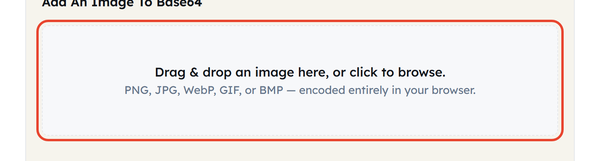
- Encoding is automatic – the Base64 output appears as soon as the file loads, with no convert button to press.
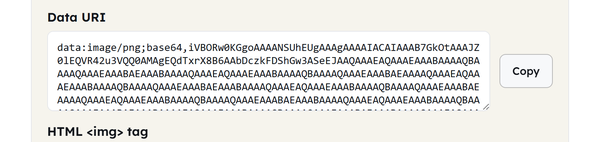
- Check the details – the card shows the image type, the original file size and the size of the Base64 string.

- Copy what you need – there are three Copy buttons, one for the raw Data URI, one for a ready-made HTML img tag and one for a CSS background-image rule.
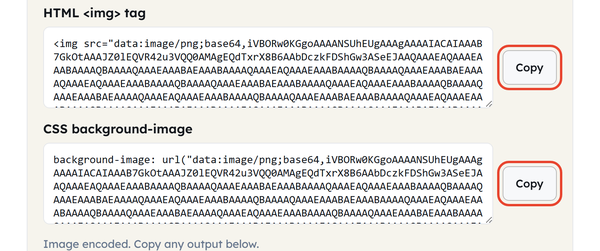
- Use it in your project — Incorporate the Base64 data into HTML, CSS, JavaScript or any supported app.
If it does make a full data URL, it will put the MIME type and base64 indicator before the data. The typical image data URL is:
data:image/png;base64,iVBORw0KGgo…
The default format of a data URL is data:[media-type][;base64],data.
What Is Base64 Encoding?
Base64 is a binary-to-text encoding method that represents binary data using a set of 64 characters. It is useful when binary data needs to be represented in a text-based format.
Images can also be base64 encoded and attached to a data: URL which allows the image to be embedded in HTML, CSS, or other document.
For example:
<img src=”data:image/png;base64,DATA” alt=”Image”>
The mime type indicates the type of image being sent, and the Base64 part is the actual encoded data of the image.
What Is an Image Data URL?
A data URL references the resource directly, instead of a file. In a picture, it can contain the MIME type of the image (such as image/jpeg), followed by a Base64-encoded representation of the image.
For example:
data:image/jpeg;base64,/9j/4AAQ…
The parts are:
- data: — indicates that the URL is a data URL.
- jpeg — indicates the type of image.
- base64 — indicates that the data is Base64 encoded.
The rest of the characters represent the data of the encoded image.
How to Use Base64 Images in HTML
An image in Base64 can be included in HTML as an <img> element:
This is the image that displays.
Sometimes you may want to reference a small image directly in the HTML file rather than using a separate image file.
How to Use Base64 Images in CSS
Also, base64 data urls can be used in css properties that take an image URL as argument.
For example:
background-image: url(“data:image/png;base64,BASE64_DATA”);
It is handy when there is a small graphic or icon or other content to embed in a stylesheet.
But Base64 is not always superior to a “standard” image URL. If the data being encoded is binary, it will take up more space in the Base64 encoding, and if it’s a large image embedded in an HTML or CSS file, these files will become unnecessarily big.
When to Use an Image to Base64 Converter
An Image to Base64 converter can be useful when:
- Using a small image that is embedded in HTML.
- Embedding a small icon as a CSS background so it needs no extra request
- Building a self-contained HTML file that carries its own images
- Testing data URLs
- Interacting with image-base64 apps/APIs
- Changing the image for a text-based configuration
Using a normal image file and URL is often more practical for larger images as Base64-encoded data is often much longer.
Base64 vs. Image URL
A normal image URL refers to another image resource:
<img src=”/images/logo.png” alt=”Logo”>
The Base64 data URL is an image with the data included directly:
<img src=”data:image/png;base64,BASE64_DATA” alt=”Logo”>
Image URL
- References the image as a separate resource.
- Has the ability to cache independently.
- Keeps the HTML and CSS files smaller
- Appropriate for larger images or images that are used repeatedly.
Base64 Data URL
- Includes the picture within the document file.
- Does not need to include an image URL
- May be suitable for smaller assets
- Makes the document or stylesheet larger
Data URLs are convenient for small embedded resources, but become unwieldy once the image is large.
Does Base64 Reduce Image Size?
No – Base64 is not compression. It re-expresses binary data as text, and that always takes more characters than the original bytes: a 2.4 KB PNG comes out as a 3.2 KB string here, roughly a third larger.
If you want to reduce the size of an image, do not use a Base64 converter, but instead an image compressor.
Base64 and Image Quality
Base64 encoding itself does not resize, compress, or otherwise alter the image data. It changes the representation of the original file’s binary data into text.
When you then decode the Base64 data and apply any further processing or exportation to the image with another tool, you will likely cause some degradation of the image quality depending on the format and its parameters.
Frequently Asked Questions
What is an Image to Base64 converter?
What is a Base64 image?
A Base64 image is an image data represented as Base64 string. It may be used directly in HTML, CSS and other contexts that support data URLs, when combined with a data URL like data:image/png;base64,….
Does Base64 change image quality?
No. The Base64 encoding does not alter the size or ‘look’ of the image. It alters the representation of the image data.
Can I use Base64 images in HTML?
Yes. Base64 data URLs are valid src attributes of HTML <img> elements. Data URLs are supported by browsers for inclusion of resources.
Can I use Base64 images in CSS?
Yes. Base64 data URLs can be used in CSS properties that take image URLs as arguments, for example the background-image.
Is Base64 better than an image URL?
Not necessarily. Base64 is great for small, self-contained assets, and regular image URLs are useful for larger images, or assets that require independent caching.
What is the difference between Base64 and a data URL?
Base64 is an encoding technique. A data URL is a URL type which may include data directly. Base64 can be used to encode the binary data of an image in an image data URL.
Can I convert Base64 back to an image?
Yes. If the Base64 string is valid and actually contains the image data, then the Base64 image data can be encoded back into the corresponding binary data.
Related Tools

Image Resizer
Resize images to exact dimensions or percentages.
- 100% Free
- Customizable
- Download
- Unlimited

Image Compressor
Shrink file size while keeping visuals sharp.
- 100% Free
- Customizable
- Download
- Unlimited

PNG to JPG
Convert PNG images to JPG with quality control.
- 100% Free
- Customizable
- Download
- Unlimited

Favicon Generator
Create favicons in multiple sizes from one image.
- 100% Free
- Customizable
- Download
- Unlimited

Image Cropper
Crop images to custom ratios and positions.
- 100% Free
- Customizable
- Download
- Unlimited