
Yes. The Meta Tags Generator is completely free and needs no registration to use.

Meta Tags Generator
Generate SEO, Open Graph, and Twitter meta tags for your pages.
What the Meta Tags Generator Does
If you have ever opened the <head> of your site and hesitated over how to write the title tag, the description or the social sharing preview, you are not alone. Meta tags are only small pieces of code, but they decide how your page appears on Google, what it looks like shared on Twitter/X, and whether your Facebook link preview comes out clean or broken. Tool Flora’s Meta Tags Generator takes the guesswork out of it: a free, browser-based tool that builds a complete set of meta tags to copy and paste, without you writing a line of code.
How to Use the Meta Tags Generator
Our tool is incredibly easy to use — you don’t have to be tech-savvy to operate it:
- Start with your basic SEO tags: page title, canonical URL, meta description, author name and the robots directive. Load sample fills every field with a worked example if you want to see the shape of the output first.
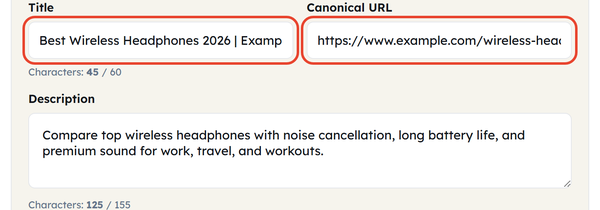
- Leave the viewport tag alone unless you need something unusual – it is already set to width=device-width, initial-scale=1.

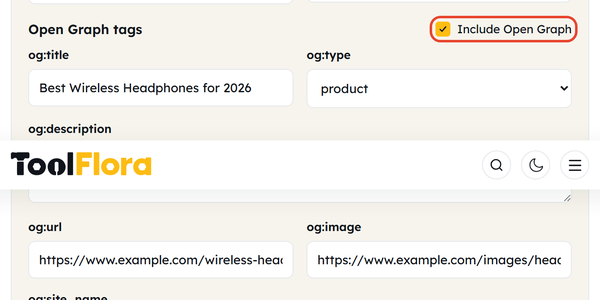
- Open Graph tags are already switched on, producing og:title, og:description, og:image, og:url, og:type and og:site_name for Facebook and LinkedIn previews. Untick the box if you do not want them.
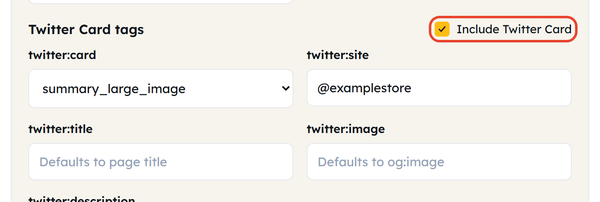
- Twitter Card tags are switched on by default too, producing twitter:card, twitter:title, twitter:description, twitter:image and twitter:site. The card type starts as summary_large_image.
- Watch the Title chars and Description chars counters as you type, so both stay inside the lengths search results will show in full.

- Use the checklist – it ticks itself as you go: title filled, title 30-60 characters, description filled, description 70-155 characters, and canonical URL set. The status reads Looking good once everything passes.

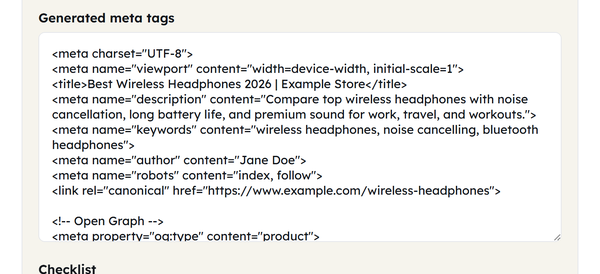
- Copy the generated code and paste it into the <head> section of your page.
What Is a Meta Tags Generator?
A meta tags generator builds the HTML meta tags that tell browsers, search engines and social networks what a page is about. They sit in the <head> of the document, so they never appear on the page itself. The ones that matter most are the basic SEO tags (title, description, robots, canonical URL), the Open Graph tags that control how a link looks on Facebook and LinkedIn, and the Twitter Card tags that do the same on Twitter/X. Rather than remembering the syntax or copying it out of an old project, this generator writes it correctly formatted for you.
When You Would Use This
This tool may come in handy in a number of different situations:
- When you want to launch a new webpage or blog post and wish to ensure that it is properly optimized for optimization prior to going live.
- When you are trying to enhance the SEO of an existing page through meta description rewriting.
- When you want to prepare shares for social media and ensure that the posted links from Twitter/X or Facebook will have the right title, image, and description, instead of an empty or non-working preview.
- When you work with a website without a CMS SEO plugin — if it does not use the WordPress, or any other similar content management system with fields for SEO.
- When teaching or learning the SEO basics through practical exercise to know and understand what those tags look like.
Do’s and Don’ts
Do:
- Keep the title between 30 and 60 characters so it is not truncated in search results.
- Keep the description between 70 and 155 characters for the same reason.
- Make sure to add a canonical URL to your page to correct potential duplicate content issues.
- Make sure to use a relevant image for the Open Graph and Twitter preview.
Don’t:
- Pad the title or description with keywords – it reads as spam and can hurt rankings.
- Leave the Open Graph and Twitter fields empty, or you lose control of how your links look when they are shared.
- Reuse the same description on every page of the site.
- Forget to change the robots tag when a page should not be indexed.
Good to Know
The tool runs a live checklist that catches the usual problems – a missing title, a description that is too long or too short, no canonical link – before you copy the code out. That means you spot the mistakes in advance rather than after the page is published. Open Graph and Twitter Card are optional: the basic SEO tags are all you strictly need.
Frequently Asked Questions
Is this tool available free of charge?
Is any coding knowledge required to use this program?
No. Fill in the form fields and the tool writes the markup for you, ready to copy.
What is the optimal length for a meta title and description?
Aim for 30 to 60 characters for the title and 70 to 155 for the description, so neither is cut short in search results. The built-in checklist uses exactly those ranges.
Is it possible to generate Open Graph tags alone without including Twitter Card tags?
Yes. The Open Graph and Twitter Card blocks have their own tick boxes, so you can switch either one off and keep the other.
Where do I insert the tags that were generated?
Paste them inside the <head> section of your page’s HTML, before the closing </head> tag.