
Not necessarily. Google sometimes rewrites one or both if it thinks something else on the page answers the query better. An accurate, well-written snippet makes that less likely, but it does not rule it out.

SERP Snippet Preview
Preview how your title, URL, and description may appear in Google search results.
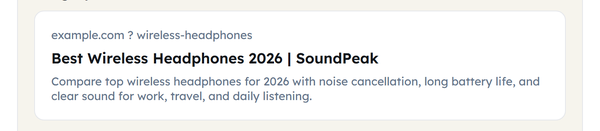
A live, styled mock-up of your search result – the title link, the breadcrumb URL and the description text, laid out the way Google presents them.
Google does not simply print what you type into your title and meta tags. It measures them by how wide they render and cuts anything past the width of a snippet, adding an ellipsis where it stops. A title that looks fine in your CMS editor can end up chopped mid-word on a real results page. This tool lays your title, URL and description out the way Google presents them, so you can read the snippet as a searcher will before it goes live.
How to Use the SERP Snippet Preview Tool
- Type or paste your page title into the Meta title field. The counter beside it reads Characters: n / 60 as you type.

- Type in your page URL – it will be formatted into the breadcrumb style Google displays above the title.

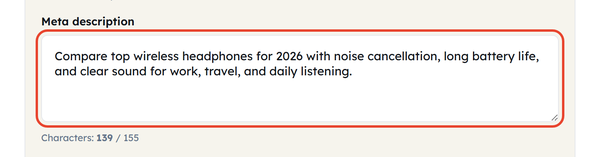
- Add your meta description. Its counter runs to 155 characters, which is the range the checklist looks for.
- Read the Google preview panel beneath the form – it shows the breadcrumb URL, the title link and the description snippet as one block, the way a searcher sees them.
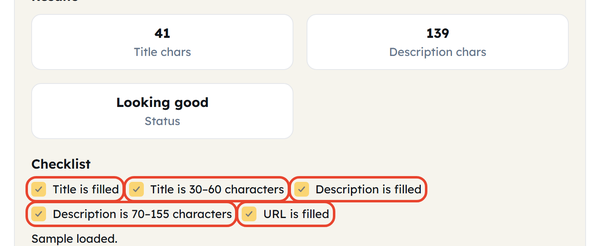
- Watch the checklist and the Status readout: title filled, title 30-60 characters, description filled, description 70-155 characters, URL filled. Status reads Looking good once all five pass.
- Use Load sample if you want a worked example to start from, or Clear to empty every field and begin again.

Why Character Counts Are Only a Guide
Most advice online still quotes fixed character limits – 60 characters for titles, 155 for descriptions. Those are rough guides rather than the real rule, because Google cuts based on the horizontal width of the text. Letters are not all the same width, so two titles with the same character count can render very differently: a title of narrow letters fits comfortably, while one full of wide capitals is cut sooner. Treat the counters here as a practical guide, and use the preview itself to judge whether the snippet still reads properly.
What the Preview Checks
Title – whether it is filled in and inside the 30 to 60 character range the checklist looks for.
URL formatting – shows how your URL appears as a breadcrumb above the title.
Description – whether it is filled in and inside the 70 to 155 character range.
Live preview – the snippet drawn the way Google lays it out, so you can read it before anyone else does.
Status – one readout that turns to Looking good when every check has passed.
Practical Uses
This tool earns its keep in a few everyday situations:
- Run a draft title and description through it before you publish a new post.
- Audit older pages that may already be getting cut off in search results.
- Compare two title variations side by side to see which one survives truncation.
- Check how a translated or localised page reads, since the same character count renders at a different width in another language.
Frequently Asked Questions
Will Google always display the title and description I provide?
Are the length limits exact?
No. The 30 to 60 and 70 to 155 character ranges are practical guides rather than official numbers, because Google truncates on how wide the text renders rather than on a character count. Use the preview to judge the result.
Does a longer title or description hurt rankings?
No, neither is a direct ranking factor. Their job is to earn the click, and a snippet that gets cut off mid-sentence can cost you traffic even from a strong position.
Is anything I type sent to a server?
No. Everything happens locally in your browser – nothing you type is transmitted or stored anywhere.