
Not line by line, but it does show a Removed count. Keep a copy of the original list if you need to know exactly what came out, then compare it against the result.

Remove Duplicate Lines
Remove repeated lines and keep only unique ones.
Any list that has grown over time – through repeated exports, merged spreadsheets or copy-pasting from several sources – almost always ends up carrying repeated entries. The Remove Duplicate Lines tool scans the list, strips the repeats and keeps only the first appearance of each line.
Copy/Paste your list, choose how strict the matching should be, and get a clean result in one click.
How to Remove Duplicate Lines Online
- Paste your list into the input box, one entry per line.
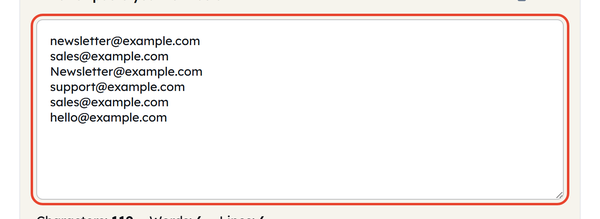
- Turn on any matching options you need: Case-insensitive, Trim before compare, or Sort result A→Z.

- Click Remove Duplicates to get the cleaned list.

- Check the counts underneath – Characters, Words and Lines, plus a Removed figure telling you exactly how many repeats came out.
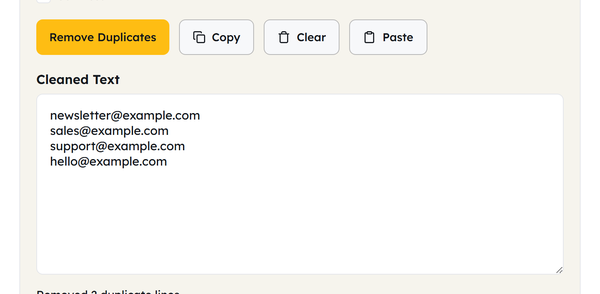
- Click Copy to grab the cleaned list, or Clear to start over.

What Does Remove Duplicate Lines Mean?
Duplicate lines are lines that appear more than once in a list. Removing them means scanning the list line by line, dropping the repeats and keeping only the unique entries. Any list that has grown over time or been pulled together from several places – exports, subscriber lists, keyword research, scraped data – will collect repeats sooner or later.
This tool provides you with three options for setting the strictness of “duplicate”:
| Option | What It Does |
|---|---|
| Case-insensitive | Ignore capitalization (e.g., “Apple” = “apple”). |
| Trim before compare | Ignores extra spaces from the start and end of lines. |
| Sort result A→Z | Alphabetizes the list instead of keeping the original order. |
When Should You Remove Duplicate Lines?
- Cleaning an email or contact list before a campaign to prevent duplicate messages being sent.
- Deduping a keyword research export before creating a content plan
- Combining two lists of URLs, such as a sitemap list and a crawl export, and removing the overlap.
- Cleaning up a list of usernames, IDs, or SKUs pulled from multiple reports
- Tidying a backlink or referring-domains list before outreach
- Removing unnecessary repeats after copy-pasting from a spreadsheet with wrapped rows
Best Practices for Removing Duplicate Lines
| Do | Don’t |
|---|---|
| Use “Trim” for pasted spreadsheet data. | Assume similar lines will match automatically. |
| For emails or urls, use “Case-insensitive”. | Use “Case-insensitive” for passwords or IDs. |
| Save a backup of your original list. | Sort A→Z if the original order matters. |
Things You Should Know Before Deduplicating a List
- Deduping compares entire lines, not individual words, so “New York” and “new york, NY” are treated as different entries unless you edit them to match first.
- Empty lines are treated as content too — if you have a few blank lines in your list, deduping will reduce them to one blank line, too.
- Turning on both “Case-insensitive” and “Trim before compare” together catches the most duplicates, since it ignores both capitalization and stray spacing at once.
- The line count before and after deduping is the fastest way to see exactly how many repeats were in your original list.
Frequently Asked Questions
Does this tool tell me which lines were removed?
What counts as a duplicate – the whole line, or just part of it?
The whole line. Two lines only match if their full text is the same, taking your Case-insensitive and Trim settings into account – a shared word or phrase is not enough.
Which copy of a duplicate line gets kept?
The first occurrence. Every later repeat is removed, so the list keeps its original first-seen order unless you turn on Sort result A-Z.
Can I use this to clean a list of URLs or email addresses?
Yes. It works on any plain text list with one item per line, and handles URLs, email addresses and keyword exports well.
Is my list uploaded or saved anywhere?
No. Your list is never sent to a server or stored – the deduplication happens in your browser.
Is there a limit to how many lines I can process?
No. It handles anything from a few lines to many thousands, and returns the result straight away.
Related Tools

Character Counter
Track characters with or without spaces in real time.
- 100% Free
- Customizable
- Download
- Unlimited

Sentence Counter
Count sentences and average length as you type.
- 100% Free
- Customizable
- Download
- Unlimited

Paragraph Counter
Measure paragraphs and structure at a glance.
- 100% Free
- Customizable
- Download
- Unlimited

Case Converter
Convert text between upper, lower, title, and more.
- 100% Free
- Customizable
- Download
- Unlimited

Remove Extra Spaces
Clean double spaces and tidy whitespace fast.
- 100% Free
- Customizable
- Download
- Unlimited

Remove Line Breaks
Flatten text by stripping unwanted line breaks.
- 100% Free
- Customizable
- Download
- Unlimited