
A text-to-slug converter turns a title or phrase into the format a web address needs. It lowercases the text, replaces spaces with hyphens, and strips punctuation that does not belong in a URL.
Text to Slug
Convert any text into a clean, URL-friendly slug.
Every page you publish needs a clean URL. Tool Flora’s text-to-slug tool builds one from your text in seconds, so you avoid the long titles full of spaces, punctuation, and filler words that never make a good web address. Enter your text and the slug appears, ready to use on blog pages, website URLs, product pages, or any other online content. For example:
Text: how to choose the best running shoes
Slug: how-to-choose-the-best-running-shoes
How to Use the Text-to-Slug Tool
You don’t have to do anything by hand; this tool is as straightforward as it gets.
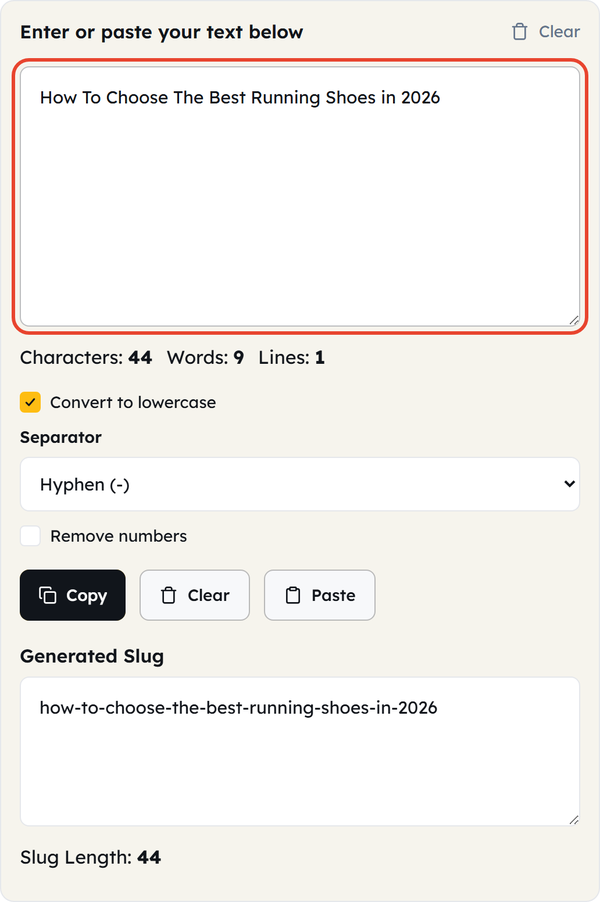
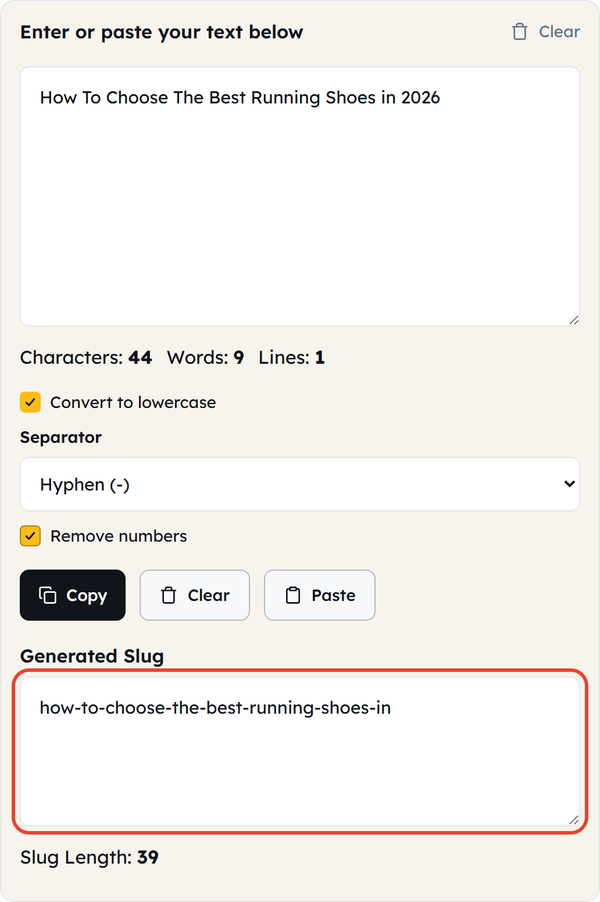
- Enter your text — type or paste into the text area, whether it is a title, a phrase, or any other text you want to turn into a slug. Paste drops in whatever is on your clipboard, and Characters, Words, and Lines are counted underneath.
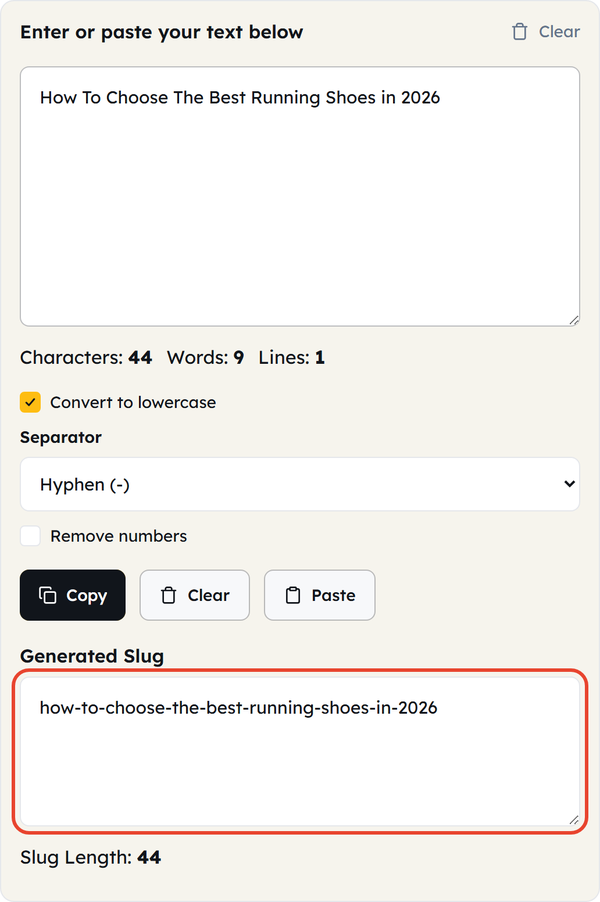
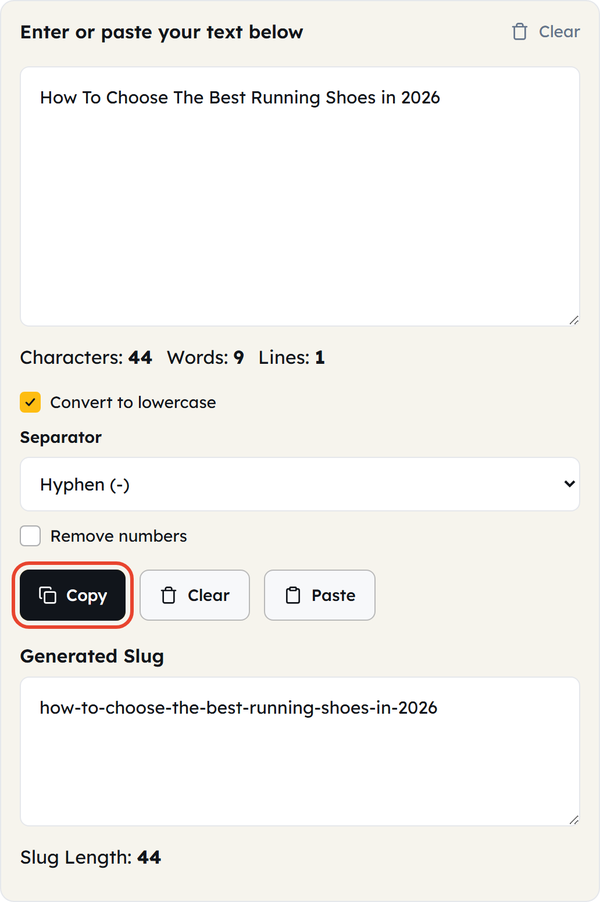
- Watch the slug appear — there is no generate button. The slug builds itself in the Generated Slug box as you type, in lowercase with your separator between the words, and a Slug Length counter sits below it.
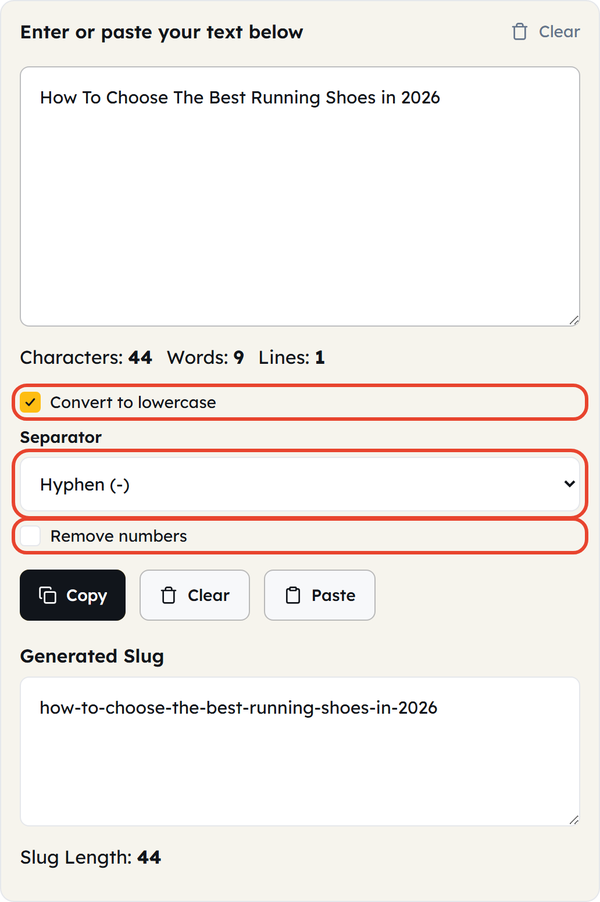
- Adjust the options if you need to — switch Separator between Hyphen (-) and Underscore (_), untick Convert to lowercase to keep the original capitalization, or tick Remove numbers to strip the digits out.
- Review the result — check that the slug describes the page properly and is not carrying words it doesn’t need.
- Make any final changes — the Generated Slug box is read-only, so edit the text you typed and the slug updates instantly. When it reads the way you want, click Copy, or Clear to start again.
What Is a URL Slug?
A URL slug is the part of a web address that comes after the domain name and identifies the particular page. For example, in:
example.com/blog/how-to-start-a-garden
The slug is:
how-to-start-a-garden
A good slug is short, descriptive, readable, and easy to remember, rather than a string of random words or a page ID. This tool turns ordinary text into that form in seconds.
When Would You Use This?
- Blog Posts — create a clean slug from your article title before publishing.
- Website Pages — keep URLs readable for service pages, landing pages, about pages, guides, and other content.
- SEO-Friendly URLs — descriptive words help both users and search engines understand what a page covers.
- Product Pages — convert product names into simple slugs for your ecommerce URLs.
- Categories and Tags — create slugs for categories, topics, and tags consistently.
- CMS Publishing — useful for content managers adding new pages or posts to a content management system.
- Web Development — convert titles or labels into URL-friendly strings while building websites and applications.
- Cleaning Existing Text — titles carrying spaces, punctuation, or capital letters become a clean starting point for a URL.
Do’s and Don’ts
Do’s
- Keep your slug short and descriptive.
- Use words that accurately describe the page.
- Use lowercase letters for consistency.
- Use hyphens to separate words.
- Remove unnecessary words when they don’t add useful meaning.
- Make sure the slug matches the content of the page.
- Check the final URL before publishing.
- Keep your website’s URL structure consistent.
Don’ts
- Don’t use random words that have nothing to do with the page.
- Don’t make URLs unnecessarily long.
- Don’t fill a slug with keywords just to include more search terms.
- Don’t use confusing strings of numbers or characters when a descriptive slug is possible.
- Don’t change an established URL without considering redirects and existing links.
- Don’t assume a slug alone will improve search rankings.
- Don’t use a slug that promises content the page doesn’t actually contain.
Good to Know
- A slug is the readable part of a URL that identifies a specific page.
- Slugs commonly use lowercase letters, numbers, and hyphens.
- Spaces are replaced with your chosen separator, and runs of several spaces collapse into one.
- You can switch the separator between a hyphen and an underscore, depending on what your platform expects.
- Remove numbers strips the digits out when a date or a year in the title would only date the URL.
- Symbols and punctuation are removed or simplified — “C++ and C# guide” becomes c-and-c-guide.
- Accented and non-Latin letters are kept as they are, so words such as München or crème need a manual edit if you want a plain ASCII URL.
- The Slug Length counter helps you keep the result short.
- A descriptive slug helps users know what to expect from a page before they open it.
- Shorter URLs are easier to read, copy, share, and remember.
- Changing a URL after a page has been published creates broken links unless the old URL is properly redirected.
- A good slug describes the page rather than repeating every word of its title.
- URL slugs are only one part of a website’s SEO and usability.
- The exact slug format can vary depending on the platform or CMS you use.
- Everything happens in your browser — your text is not uploaded anywhere.
What Makes a Good URL Slug?
A good slug tells the user what the page is about. For example:
page-12345 says nothing, while how-to-grow-tomatoes tells the reader exactly what they are about to open.
Focus on the main topic. You don’t need to copy the page title word for word. For example:
Title: A Complete Guide To Choosing The Best Laptop For College Students
Possible slug: best-laptops-for-college-students
Why Are URL Slugs Important?
A URL is more than an address. A clear one tells users where a link will take them before they click. Compare example.com/p=73982 with example.com/online-photo-editing-guide.
The second URL tells both readers and search engines what the page is about, although a good slug on its own does not promise a higher ranking.
Slug vs. URL: What’s the Difference?
Slug and URL are related but not the same. A URL is the complete web address of a resource, while the slug is the page-specific portion of it. For example:
In https://example.com/blog/how-to-grow-tomatoes, the slug is how-to-grow-tomatoes.
How to Create an SEO-Friendly Slug
Keep the main topic and drop everything that isn’t carrying its weight. For example:
Page title: How To Start A Small Vegetable Garden At Home
A clean slug could be: start-small-vegetable-garden
Accurate wording without extra keywords makes the slug more useful. A readable, descriptive URL is generally better than one padded with search terms.
Should You Change a Slug After Publishing?
It is always better to settle on the right slug before you publish. Once a page is indexed, shared, or linked to, changing its URL stops the old address from working unless you put a proper redirect in place.
Frequently Asked Questions
What is a Text-to-Slug converter?
What is a URL slug?
It is the descriptive part of a web address that identifies a particular page, the piece that comes after the domain name and any folders.
How do I create a slug?
Type or paste your title into the text area. The slug appears in the Generated Slug box straight away — there is no button to press. Review it and click Copy.
Should a slug be lowercase?
Lowercase gives you a readable, consistent URL, which is why the Convert to lowercase option is switched on by default. Your website platform may have its own conventions too.
Should I use hyphens in a slug?
Yes. Hyphens are the usual separator between words because they keep the URL readable. This tool also offers underscores if your platform expects them.
Should a slug contain spaces?
No. Spaces are replaced with your chosen separator, which produces a cleaner URL than the percent-encoded version a space would otherwise become.
Should I include keywords in my slug?
Include the main word that describes the page accurately, but avoid padding the slug with extra search terms.
How long should a URL slug be?
There is no universal character limit, but a short, concise slug is always the better choice. The Slug Length counter under the output box tells you where you stand.
Can I use numbers in a slug?
Yes, and the Remove numbers option strips them out when you would rather they were not there. Avoid random numbers unless they serve a purpose.
Can I use a slug for a blog post?
Yes. Blog posts commonly use descriptive slugs based on their titles or main topics.
Can I use the tool for product URLs?
Yes. You can convert a product name into a cleaner slug and use it as part of the product’s URL.
Does a good slug improve SEO?
A clear, descriptive URL helps users and search engines understand the page, but a slug alone does not guarantee better rankings. Search visibility depends on many factors.
Can I change a slug later?
Yes, but change the URL of an existing page carefully. If the old URL is already indexed or linked elsewhere, set up a redirect so nothing breaks.
Does a slug have to exactly match the page title?
No. A slug can be much shorter than the page title as long as it still describes the page accurately.
Can I use special characters in a slug?
It is better to keep slugs to letters, numbers, and hyphens. This tool removes symbols such as %, #, and + for you and collapses the gaps they leave behind.
Can I edit the generated slug?
Not in the output box, which is read-only. Edit the text you typed in the box above and the slug updates instantly, or copy the slug and adjust it in your CMS.
Is the Text to Slug tool free?
Yes. Tool Flora provides the Text to Slug converter as a free online utility you can use directly in your browser.
Do I need to install anything?
No. The tool runs in your web browser with nothing to install, and your text is converted on your own machine rather than sent to a server.
Related Tools

Character Counter
Track characters with or without spaces in real time.
- 100% Free
- Customizable
- Download
- Unlimited

Sentence Counter
Count sentences and average length as you type.
- 100% Free
- Customizable
- Download
- Unlimited

Paragraph Counter
Measure paragraphs and structure at a glance.
- 100% Free
- Customizable
- Download
- Unlimited
Case Converter
Convert text between upper, lower, title, and more.
- 100% Free
- Customizable
- Download
- Unlimited

Remove Extra Spaces
Clean double spaces and tidy whitespace fast.
- 100% Free
- Customizable
- Download
- Unlimited

Remove Line Breaks
Flatten text by stripping unwanted line breaks.
- 100% Free
- Customizable
- Download
- Unlimited