
Paste or type your text into a case converter and select the lowercase option. The uppercase letters will be changed to lowercase without requiring you to retype the text.
Upper Case To Lower Case: How To Change Text Case Easily
Have you ever typed something in lowercase but realised you need it in capital letters, or written something in uppercase but need it in lowercase or sentence case? Perhaps it...
 ToolHub Admin
Published On: September 10, 2026
Have you ever typed something in lowercase but realised you need it in capital letters, or written something in uppercase but need it in lowercase or sentence case? Perhaps it happened to you, but how did you solve this? Perhaps you rewrote that part or manually fixed things. Changing the capitalization of a few words is easy, but not when you have a complete paragraph, product list, heading, article, or document; fixing cases manually quickly becomes frustrating.
This is where a case converter can help you save time and avoid spoiling your mood. There are many online Case converter tools, but finding the best one that causes no issues while using it can be a bit hard, so we are introducing Toolflora’s case converter, which can help you change text between different capitalization styles without retyping. You can convert uppercase to lowercase, lowercase text into uppercase, create title case, switch sentence capitalization, or flip the case of each letter.
Uppercase To Lowercase: Meaning And Use
Changing capital letters to small letters is what uppercase to lowercase means; for example:-
Before: TIGER IS A NATIONAL ANIMAL OF INDIA
After: tiger is a national animal of india
Converting from uppercase to lowercase is useful and easy to use with the right tool. Toolflora’s case converter can help you with its straightforwardness and ease of use, where you just need to:-
- Open the case converter
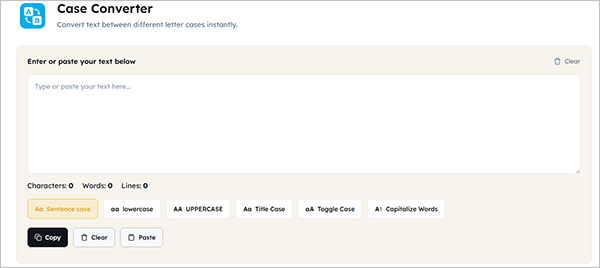
- Type or paste the intended text inside the text box
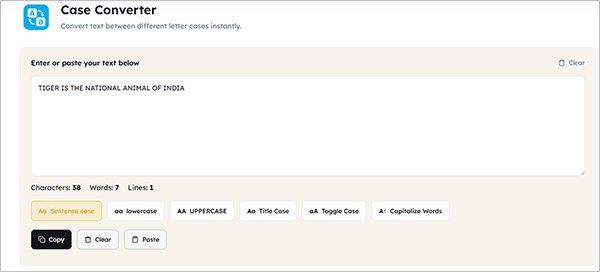
- Select the lowercase option or the one of your choice
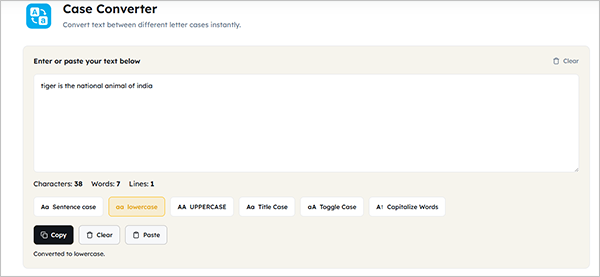
- Review the converted text
- Copy the output and use it wherever it is required
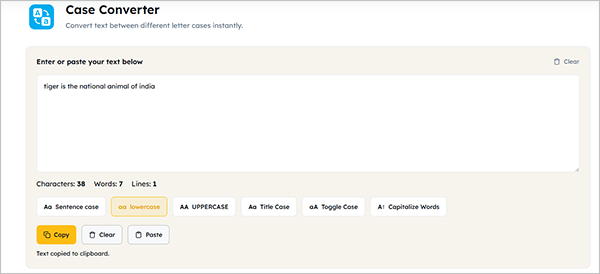
The tool is very useful when working with a large amount of text or when you accidentally left Caps Lock on while typing. Toolflora’s simple case converter tool can be very helpful; it also provides live character, word, and line counts while you work.
When Is It Useful?
There are plenty of situations where you may need to change capital letters to lowercase. Let’s discuss such situations:-
1. Cleaning copied text
Text copied from websites, PDFs, documents, or other sources may have inconsistent capitalization. Converting it to lowercase can give you a clean starting point before applying your preferred formatting.
2. Editing articles
Writers and editors sometimes receive text where headings, paragraphs, or sections have been typed in all caps. Converting the text to lowercase makes it easier to reformat.
3. Working with product information
Product lists and descriptions can sometimes contain inconsistent capitalization. A case converter can help standardize large amounts of text before you review the final version.
4. Preparing social media content
You may want a caption or piece of text to follow a particular style. Converting uppercase text to lowercase can quickly give you a consistent format.
5. Fixing Caps Lock mistakes
I ACCIDENTALLY TYPED THIS ENTIRE SENTENCE IN CAPS.
Instead of starting again, you can convert caps to lowercase and continue editing.
Upper To Lowercase Isn’t The Only Conversion You Can Make
Although uppercase to lowercase is one of the most common reasons people use a case converter, you may need the opposite conversion as well and may need other capitalization styles. Toolflora provides many styles in one place, along with uppercase and lowercase:-
- UPPERCASE: Changes applicable letters to capitals.
- Lowercase: Changes applicable letters to lowercase.
- Title Case: Capitalizes the beginning of every word.
- Sentence case: Capitalizes the beginning of sentences.
- Toggle Case: Switches uppercase letters to lowercase and lowercase letters to uppercase.
- Capitalize Words: Places a capital at the beginning of each word.
When Should You Use A Case Converter?
A case converter can help you standardize capitalization quickly. Some common situations may be:-
- Editing blog posts
- Formatting headings
- Cleaning copied text
- Preparing product descriptions
- Formatting social media captions
- Standardizing lists
- Working with spreadsheet data
- Preparing website content
- Fixing accidental Caps Lock typing
- Converting text before placing it into another application
Things To Check After Conversion
Automatic conversion is fast, but it is still worth reviewing the result.
Proper names
A person’s name, company name, place name, or product name may have a specific capitalization that should be preserved.
Acronyms
Terms such as technical abbreviations and organization names may need special capitalization.
For example, converting everything to lowercase could change an acronym into a form that is no longer correct.
Technical content
Be particularly careful when converting programming-related text. Capitalization can matter in variable names, function names, class names, and other identifiers. ToolFlora specifically recommends checking code rather than blindly converting it.
Headings and titles
A simple capitalization rule may not match the style guide you are following. Always check the final heading against the requirements of the website, publication, or document.
Does Changing Case Change The Meaning?
Changing letter case does not change words themselves. However, capitalization can carry meaning in certain situations. For example, a brand may intentionally use a specific capitalization. Programming languages can also identify based on capitalization. This is why we should always review the converted text before publishing or submitting.
Frequently Asked Questions
How do I convert uppercase to lowercase?
How do I convert capital letters to lowercase?
Use the lowercase option in a case converter. For example, HELLO WORLD becomes hello world.
Can I convert caps to lowercase online?
Yes. You can paste your all-caps text into ToolFlora’s Case Converter and select the lowercase option.
How do I convert lowercase to uppercase?
Paste your lowercase text into the converter and select UPPERCASE. For example, hello world becomes HELLO WORLD.
Is lowercase to caps the same as lowercase to uppercase?
Yes. In everyday use, “lowercase to caps” and “lowercase to uppercase” generally describe the same conversion.
Can I convert lowercase to all caps?
Yes. Select the UPPERCASE option to turn applicable lowercase letters into capital letters.
Does a case converter change my words?
No. Case conversion changes capitalization rather than rewriting the words. You should still proofread your text for spelling, grammar, punctuation, and meaning.
Can I use a case converter for a whole paragraph?
Yes. You can paste a paragraph or a larger block of text and convert its capitalization at once. ToolFlora is designed to work with text ranging from short snippets to larger blocks.
Can I use an online case converter for code?
You can use case conversion for certain text-based development tasks, but be careful with actual code. Capitalization can affect identifiers such as variables, functions, and classes, so blindly converting code can cause problems.
Does changing uppercase to lowercase fix grammar?
No. It only changes letter capitalization. Grammar, spelling, punctuation, and sentence structure still need to be checked separately.
Is ToolFlora’s Case Converter free?
Yes. ToolFlora provides the Case Converter as a free browser-based text utility.
Related Blogs
Upper Case To Lower Case: How To Change Text Case Easily Have you ever typed something in lowercase but realised you need it in capital letters, or written something in uppercase…