
A 16:9 aspect ratio refers to an image or screen that has 16 units of width for every 9 units of height. It is a widescreen ratio that is frequently used in video presentations.
16:9 Aspect Ratio: Meaning, Resolution List, Pixel Sizes, And Examples
The most widely used aspect ratio is 16:9, which you can find almost everywhere, whether for a movie, a presentation, any video, or even devices that are designed to be...

 ToolHub Admin
Published On: November 5, 2026
The most widely used aspect ratio is 16:9, which you can find almost everywhere, whether for a movie, a presentation, any video, or even devices that are designed to be in that aspect.
Today we will discuss this topic in depth, which is going to help in understanding the meaning of this aspect and its importance, with comparisons to other aspects and examples as well. So, let’s go…..
What Is A 16:9 Aspect Ratio?
The aspect ratio tells the relationship between the height and width of an image or screen; for example, the 16:9 aspect ratio means that for every 16 units of width, there are 9 units of height.
For example, 1920 pixels × 1080 pixels is referred to as a 16:9 aspect ratio. When you divide them, you get the same result as when you divide 16 and 9.
Other examples include 1280 × 720 and 3840 × 2160.
What Does 16:9 Mean In Pixels?
Since you have an idea about what 16:9 is, let’s talk about what pixels are.
One of the units for measuring digital dimensions is pixels, which tells how many pixels there are both vertically and horizontally. For example:-
- 1280 × 720 pixels
- 1920 × 1080 pixels
- 2560 × 1440 pixels
- 3840 × 2160 pixels
All the above-mentioned pixel examples have the same 16:9 aspect ratio.
Common 16:9 Resolution List
| Resolution name | Pixel dimensions | Common use |
| 360p | 640 × 360 | Lower-resolution video |
| 480p | 854 × 480 | Standard-definition widescreen video |
| 720p (HD) | 1280 × 720 | HD video and smaller displays |
| 1080p (Full HD) | 1920 × 1080 | Monitors, TVs, and online videos |
| 1440p (QHD) | 2560 × 1440 | Higher resolution monitors |
| 2160p (4K UHD) | 3840 × 2160 | 4K television and videos |
| 4320p (8K UHD) | 7680 × 4320 | 8K displays and videos |
How To Calculate A 16:9 Resolution
It’s a simple concept that, when you understand it, you do not need to memorise it after. The relationship between its width and height is 16:9, which means:-
- Height = width × 9 ÷ 16
- Width = height × 16 ÷ 9
Let’s look at some examples to understand it better.
- Calculate height from width.
Let’s create a 16:9 image that is 1600 pixels wide:-
Height = width × 9 ÷ 16
Height = 1600 × 9 ÷ 16
Height = 900 pixels
- Calculate width from height.
Let’s create a 16:9 that is 720 pixels high.
Width = height × 16 ÷ 9
Width = 720 × 16 ÷ 9
Width = 1280 pixels
- Calculate a smaller 16:9 image.
Let’s try with 800 pixels wide.
Height = 800 × 9 ÷ 16
Height = 450 pixels
Note: Round up the decimal results, as image or screen dimensions are usually expressed in whole pixels.
What Is A 16:9 Screen Resolution?
A resolution that uses a 16:9 display ratio is a screen resolution in which the aspect ratio is such that the width has 16 units whereas the height has 9 units. An illustration of such a resolution is a monitor with a resolution of 1920 x 1080, meaning 1920 units horizontally and 1080 vertically. When you divide both numbers by 120, you get 16 and 9.
It doesn’t depend on the device size; two monitors of different sizes can still have a 16:9 aspect ratio.
Where Is The 16:9 Aspect Ratio Used?
The 16:9 aspect ratio can work well with screens and digital content, providing a wide view of the content to the viewers. Some of the places where it is used:-
- YouTube and online videos
- Television screens
- Computer monitors and laptops
- Presentations
- Digital images and graphics
16:9 Vs Other Common Aspect Ratios
| Aspect ratio | Shape | Common applications |
| 1:1 | Square | Profile images and square graphics |
| 4:3 | Traditional rectangular | Older television and display formats |
| 3:2 | Slightly wider rectangle | Photography |
| 16:9 | Widescreen | Videos, monitors, and presentations |
| 21:9 | Ultrawide | Ultrawide monitors and cinematic viewing |
16:9 Aspect Ratio Vs Resolution: What Is The Difference?
Each has its own meaning, yet they relate to each other: aspect ratio tells you about the proportionality of the image or given screen, and aspect resolution tells you about how many pixels are on the screen. For example:-
| Dimensions | Aspect ratio | Resolution level |
| 1280 × 720 | 16:9 | HD |
| 1920 × 1080 | 16:9 | Full HD |
| 2560 × 1440 | 16:9 | QHD |
| 3840 × 2160 | 16:9 | 4K UHD |
How To Resize An Image Or Video To 16:9
Resizing an image or video helps you get it cropped to another format, like in this case, a 16:9 frame. Some basic steps you can consider to follow to achieve a better outcome.
- Check the original dimensions
- Calculate the required dimensions
- Choose your output resolution
- Resize proportionality
- Crop the image if necessary
- Review the result
Common Mistakes To Avoid When Using 16:9
Mistakes you should keep in mind to avoid them and get better outcomes:-
- Confusing aspect ratio with resolution
- Entering the wrong width and height
- Stretching an image
- Ignoring platform requirements
- Choosing a resolution without considering the display
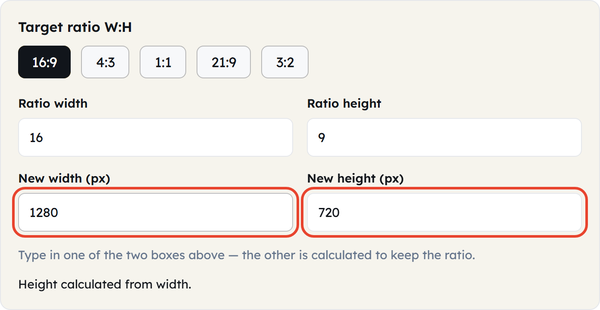
How An Aspect Ratio Calculator Can Help
To understand the aspect ratio, manual calculation can help, but when working in a workflow, you will need a calculator that can save you time and help you get the outcome fast enough, whether for image, video, or digital content.
Using ToolFlora’s Aspect Ratio Calculator can help you with that, with its beginner-friendly interface and fast calculation. You can consider the following steps:-
- Enter the original height and width.
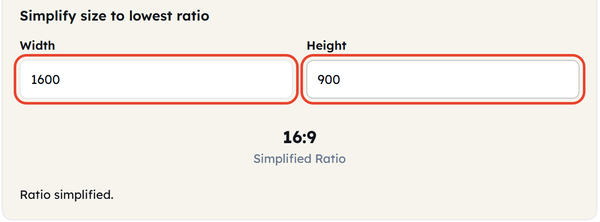
- Check the aspect ratio of the existing dimensions.
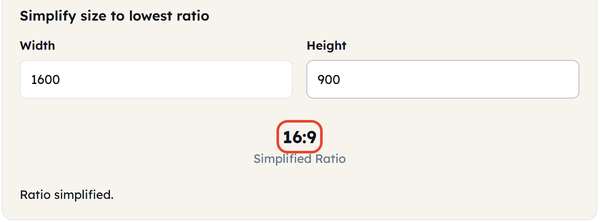
- Choose the new height and width you need or want.
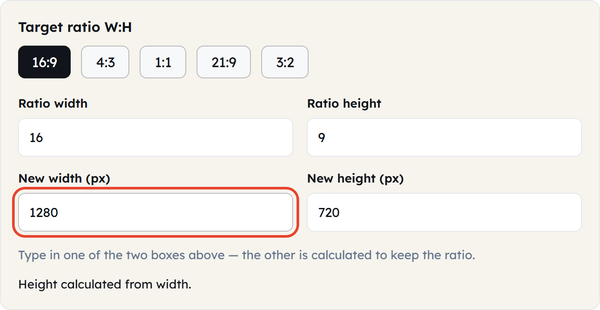
- Calculate the corresponding dimensions.
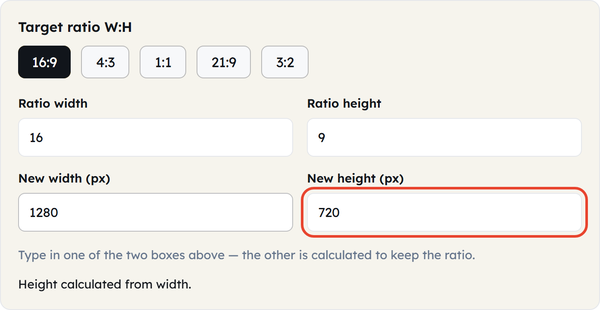
- Review the result before resizing your image or video.
Frequently Asked Questions
1. What is a 16:9 aspect ratio?
2. What is the most common 16:9 resolution?
1920×1080 pixels, also referred to as Full HD or 1080p, is one of the popular resolutions with the 16:9 ratio. There are other popular resolutions such as 1280×720 and 3840×2160.
3. What is the 16:9 aspect ratio in pixels?
There is no fixed pixel size for the 16:9 aspect ratio. Some of the popular sizes of 16:9 include 1280 x 720, 1920 x 1080, 2560 x 1440, and 3840 x 2160 pixels.
4. How do I calculate 16:9 resolution?
Height can be calculated as width times 9, divided by 16. In order to calculate the width, one should multiply the height by 16 and divide by 9.
5. Is 1920 × 1080 a 16:9 resolution?
Yes, because dividing 1920 by 1080 results in approximately 1.777, which is the same ratio as that of 16 to 9.
6. Is 1280 × 720 a 16:9 resolution?
Yes. 1280 × 720 is an HD resolution that gives the same outcome as a 16:9 aspect ratio.
7. Is 4K a 16:9 resolution?
It should be noted that the popular resolution for 4K UHD, 3840 x 2160, is 16:9. Nevertheless, there are many resolutions that fall into the category of 4K, depending on the context.
8. What is the difference between 16:9 and 4:3?
The proportions of 16:9 are wider compared to those of 4:3. 16:9 is usually applied to widescreen video and displays, whereas 4:3 is related to conventional TV and displays.
9. Can I convert any image to 16:9?
Yes. You can adjust your picture to fill a 16:9 aspect ratio. Cropping involves deleting parts from the original picture, whereas resizing without maintaining the original aspect ratio may distort the image.
10. Which 16:9 resolution should I use for a video?
Different resolutions will depend on your project needs. For high definition (HD) projects, you can use 1280 × 720. Some full HD projects use 1920 × 1080, while some higher resolutions include 2560 × 1440 and 3840 × 2160.
Conclusion
The 16:9 aspect ratio is a very common format for videos, televisions, computer monitors, presentations, and digital graphics. The distinctive feature of this aspect ratio is the proportionality of 16 horizontal units and 9 vertical units.
Knowing the difference between the aspect ratio and resolution allows you to find the right dimensions. Regardless of whether you have 1280 x 720, 1920 x 1080, or 3840 x 2160 pixels, the picture will have the same 16:9 form as long as you keep proportions constant.
If you often change the sizes of images or create video content, then an aspect ratio calculator may be useful for you as a helper to find the right dimensions without doing tedious calculations manually. You can use the calculator tools on ToolFlora to calculate proportions and prepare your content.
Related Blogs
 Calculate Birth Date From Age: How To Find Your Date Of Birth
Learn how to calculate birth date from age with a reference date and simple subtraction, plus worked examples, an age…
 Chronological Age: Meaning, How to Calculate It, and Practical Examples
How old are you? Somebody has surely asked you this question, to which you would reply with your age, not…
 How Many Days Old Am I? Calculate Your Age In Days, Months, Hours, And…
Do you know how old you are? Of course you do, but do you know how old you are “in…