
These tools are designed to help you execute daily tasks, from counting words to changing cases, from reversing text to creating URL-friendly slugs.
Top 16 Text And Writing Tools For Writers, Students, And Marketers
While working, you may need to check how many words you have written, arrange lists, or create URL slugs. Doing these little tasks for a huge project can suck up...

 ToolHub Admin
Published On: September 29, 2026
While working, you may need to check how many words you have written, arrange lists, or create URL slugs. Doing these little tasks for a huge project can suck up all your time and leave you frustrated as well. Toolflora’s text and writing tools can save you time so you can do more work while the tools handle small tasks with a simple command in seconds.
Whether you are a writer, student, developer, or anyone who works with text, get help preparing a blog, assignment, website content, or any other related tasks.
Top Text And Writing Tools On Toolflora
WORD COUNTER
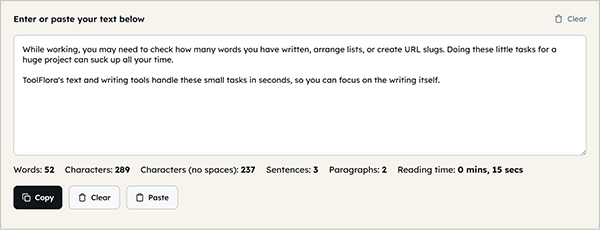
The word counter tool can be useful when writing an article, essay, report, or caption, and you need to track the number of words. It can be particularly useful when you need to stay under a limit.
When it can be useful:-
- Checking the length of blog posts
- Preparing academic assignments
- Reviewing articles and reports
- Meeting a client’s content requirements
- Checking short-form content
- Monitoring writing length while editing
CHARACTER COUNT
There are some platforms where the number of characters matters more than words, including social media posts, titles, and messages. Toolflora’s character counter can help you check and stay within the intended limit.
Where can it be useful:-
- Social media copy
- Short descriptions
- Online forms
- Marketing messages
- SEO metadata checks
- Content editing
Try: https://toolflora.com/text-and-writing/character-counter/
CASE CONVERTER
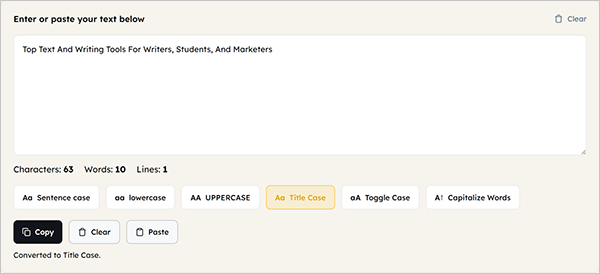
One of the common editing tasks is to change uppercase to lowercase or vice versa to save you time. There is a tool from Toolflora that does this work within a few seconds. Instead of retyping each word, use a case converter to transform your text between uppercase, lowercase, title case, and other supported formats.
When can it be useful:-
- Converting uppercase to lowercase
- Converting lowercase to uppercase
- Formatting headings
- Cleaning imported content
- Preparing marketing copy
- Standardizing text
REMOVE EXTRA SPACES
Sometimes you need a tool that makes your messy text clean by removing unnecessary spaces or whitespace, and Toolflora listed a tool just like this: the Remove Extra Spaces tool helps you clean your text without doing it manually.
When can it be useful:-
- Copied website content
- Text transferred between applications
- Blog drafts
- Spreadsheet text
- Imported documents
- General content cleanup
Try: https://toolflora.com/text-and-writing/remove-extra-spaces/
REMOVE LINE BREAKS
Copied text from external sources can sometimes contain line breaks, and the remove line breaks tool helps flatten fragmented text by removing unwanted breaks.
When you can use it:-
- Cleaning copied website content
- Fixing text copied from PDFs
- Preparing content for CMS platforms
- Combining broken paragraphs
- Cleaning bulk text
Try: https://toolflora.com/text-and-writing/remove-extra-spaces/
FIND AND REPLACE
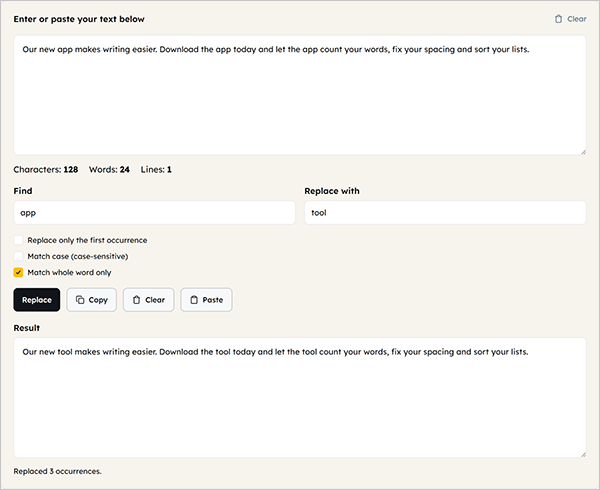
You may need to change a particular word in your text that is repeating many times. Doing it manually, word by word, can take time and be really exhausting, especially for huge projects. At that time, the find and replace tool helps you do that quickly by replacing the word with a new one, but what makes it more effective is that it offers options for case and whole-word matching.
When it can be useful to you:-
- Updating a company or product name
- Correcting repeated spelling mistakes
- Changing terminology throughout an article
- Updating old information
- Editing large blocks of text
TEXT TO SLUG
You can get help from the text-to-slug tool by converting a phrase or text to get a readable, URL-friendly slug.
When can you use it:-
- Creating blog URLs
- Preparing website pages
- Building landing page URLs
- Cleaning long titles
- Planning SEO-friendly URLs
WORD FREQUENCY COUNTER
You can know how many times a word repeats itself with the help of a word frequency counter that helps writers, editors, and SEO content creators.
What you can do with this tool:-
- Find repeated words
- Review content patterns
- Identify overused terms
- Check writing habits
- Review SEO content
- Improve content variety
SENTENCE COUNTER
The sentence counter tool helps you review your text for its readability and structure; it can also tell you about the repetition of any sentence and the average length of a particular sentence.
It can be useful when:-
- You are writing a blog
- Academic writing
- Content reviews
- Checking sentence lengths
- Editing long-form articles
Try: https://toolflora.com/text-and-writing/sentence-counter/
PARAGRAPH COUNTER
While creating any document, you may need to set it up structurally, and at that time you can get help from a paragraph counter to measure the number of paragraphs in your document.
When can it be useful:-
- Essays
- Articles
- Reports
- Assignments
- Long-form content
Try: https://toolflora.com/text-and-writing/paragraph-counter/
LINE COUNTER
The line counter tool helps with content that has been written in lines rather than in paragraphs and can count both blank and filled lines.
Where it can be used:-
- Lists
- Copied data
- Text files
- Bulk content
- Simple text analysis
REMOVE DUPLICATE LINES
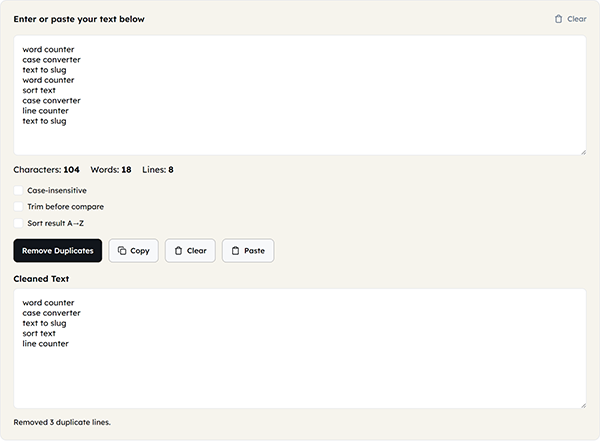
Whenever working with lists, copied data, keywords, or bulk text, you may have mistakenly entered duplicate lines, which is normal. To fix this, the remove duplicate lines tool can prove to be effective, as it helps remove repeated lines after properly identifying them while preserving the remaining part of the content.
When you can use it:-
- Cleaning keyword lists
- Removing duplicate names
- Cleaning copied lists
- Preparing bulk text
- Organizing datasets
Try: https://toolflora.com/text-and-writing/remove-duplicate-lines/
SORT TEXT
Sorting the text is easier for you to handle and for viewers as well. The sort text tool helps you do that properly; sometimes it may use alphabetical order, as per the text.
When can you use it:-
- Names
- Keyword lists
- Product lists
- Content ideas
- Simple text datasets
REVERSE TEXT
The reverse text tool helps you reverse the order of characters, words, or lines quickly.
Writers can use it when:-
- Text experimenting
- Formatting tasks
- Programming exercises
- Testing
- Creative text manipulation
TEXT REPEATER
The text repeater tool can help you repeat a word, line, or a piece of text multiple times, adding to the transformative utilities of Toolflora.
Where it can be used:-
- Testing text fields
- Creating repeated sample content
- Formatting experiments
- Development testing
- Repetitive text tasks
LOREM IPSUM GENERATOR
Designers and programmers need to use dummy text until the final content is available. The Lorem Ipsum Generator allows the creation of paragraphs, sentences, or words for use while designing and testing the specific webpage.
When you can use it:-
- Designing website layouts
- Testing typography
- Building prototypes
- Creating wireframes
- Checking content spacing
Which Text Tool Should You Use?
| YOUR TASK | TOOL TO USE |
| Count words | Word counter |
| Count characters | Character counter |
| Count sentences | Sentence counter |
| Count paragraphs | Paragraph counter |
| Count lines | Line counter |
| Find repeated words | Word frequency counter |
| Remove unnecessary spaces | Remove extra spaces |
| Remove unwanted line breaks | Remove line breaks |
| Remove repeated lines | Remove duplicate lines |
| Replace a word or phrase | Find and replace |
| Change case | Case converter |
| Arrange text alphabetically | Sort text |
| Reverse text | Reverse text |
| Repeat text | Text repeater |
| Create a URL slug | Text to slug |
| Generate placeholder text | Lorem ipsum generator |
Word Count Vs Character Count: Which One Matters Most?
Both measure different things and are used for different situations; the only common thing between these two is that they both count.
A word counter can be helpful when word count matters most, like when doing an assignment, making a report, writing an essay, etc., while a character counter can be helpful when character count matters most; it is usually for short-form content, including forms, social media captions, descriptions, etc.
They are both useful when creating SEO titles and meta descriptions, but don’t rely on word or character count alone, as they only help you reach the intended goal, not a guarantee of how a search engine displays your content.
How These Tools Can Fit In Your Workflow
It is not compulsory to use every tool; a simple set of two or three tools can be effective if they integrate into your workflow smoothly, but how? Let’s say you have written some content; you can check the length using tools like a word counter or character counter.
You can clean the text with the help of tools like removing extra spaces, removing line breaks, or removing duplicate lines; you can also improve the consistency of your text with tools like case converter, find and replace, or sort text.
After all this, your text must be ready to publish; at this time, you can use a text-to-slug tool to create an effective, readable, URL-friendly phrase and, lastly, review it using a word frequency counter to ensure accuracy.
Why Use Toolflora Text & Writing Tools?
Using tools from Toolflora gives you benefits like:-
- Every tool is available in one place
- Easy-to-use interface
- You can use every tool directly in your browser
- You don’t need to install anything
- Nothing is saved on any server, ensuring safety
And much more, whether you’re a writer, editor, student, marketer, developer, or anyone with a need for text. You don’t need to search for each tool anywhere else when every tool is here, which makes it convenient for any user, especially those short on time or beginners.
Frequently Asked Questions
What are text and writing tools used for?
Are ToolFlora Text & Writing tools free?
Absolutely, you can use these tools for free.
Can I use these tools for academic writing?
Of course, you can use Word Counter, Sentence Counter, Paragraph Counter, and text-cleaning utilities to help with assignments, essays, reports, and other academic work alongside your institution’s specific formatting and submission requirements.
Can writers use a Word Frequency Counter for SEO?
Yes, you can use it to identify repetition in your content while focusing on good seo content, usefulness, relevance, readability, and search intent.
Is a Text to Slug tool useful for SEO?
It can help you create readable, URL-friendly slugs for your webpages, though it is still part of creating a well-structured and search-friendly website.
Do I need to install software?
No, you don’t need to install anything because Toolflora brings all these useful utilities for free to use directly in your browser.
Can I use these tools on my phone?
Absolutely, these tools can work smoothly on any device, with variations in your experience.
Is my text uploaded to a server?
You don’t need to worry, as ToolFlora brings browser-based tools that don’t need to upload any information to a server.
Related Blogs
 Top 17 Developer & Encoder Tools For Everyday Coding Tasks
 Time is precious for professionals like developers to execute different tasks, such as formatting JSON, encoding a URL, converting Markdown…
 Top 11 Best Seo Tools Available Online For Free
 Once your website is ready to rank on search engines, you will need multiple SEO tools to help you get…
 Binary To Decimal: How To Convert Binary And Decimal Numbers
In mathematics, there are multiple number systems, each used for its own specific reasons; one of which is the binary…